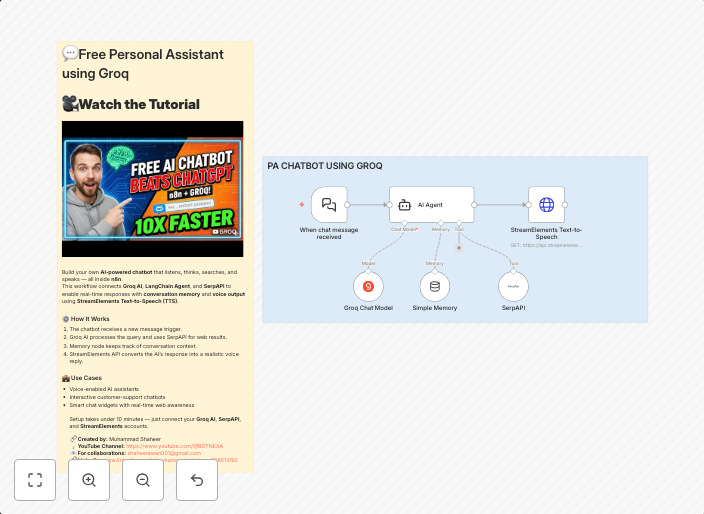
Create a voice-enabled AI assistant with Groq, SerpAPI and TTS
What It Does Build your own AI Chatbot that listens, thinks, searches, and speaks — all inside n8n.This template combines Groq AI, LangChain Agent, SerpAPI,...
Get This WorkflowAbout This Workflow
What This Workflow Does
This workflow enables you to create a voice-enabled AI assistant that integrates search functionality with Google search results provided by SerpAPI, leveraging the power of Groq AI and LangChain Agent. The AI assistant can listen, think, and speak, using text-to-speech (TTS) capabilities to interact with users.
Who Should Use This
This workflow is designed for developers, marketers, and business owners who want to build custom AI-powered chatbots for various applications, such as customer support, personal assistants, or smart home systems.
Key Features
- Voice-enabled interface: The workflow allows users to interact with the AI assistant using voice commands.
- Search functionality: Integrates with SerpAPI to provide Google search results, enabling the AI assistant to answer questions and provide information.
- Groq AI and LangChain Agent integration: Leverages the power of these AI frameworks to enable the assistant to think and respond to user input.
- Text-to-speech (TTS) capabilities: Uses TTS to convert text output into spoken language, enabling the AI assistant to communicate with users.
How to Get Started
To start using this workflow, import it into your n8n account and customize the settings to fit your specific use case. You can then use the AI assistant to interact with users and automate tasks, such as answering frequently asked questions or providing product information.
Use This Workflow in n8n →Similar Workflows




Affiliate Disclosure: We may earn a commission if you sign up for n8n through our links. This doesn't affect our recommendations.