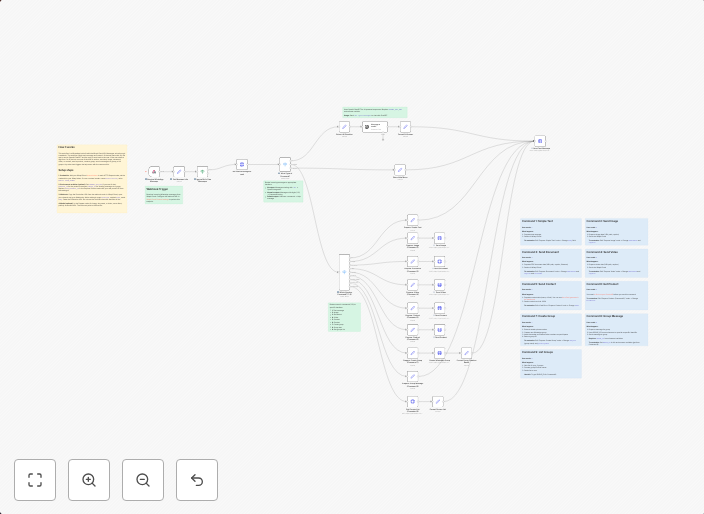
Create an AI chatbot for WhatsApp with Whapi.Cloud and OpenAI GPT-3.5
How it works:• Receives WhatsApp messages via webhook from Whapi.Cloud• Routes commands: AI chat (/ai), numeric commands (1-9), or help menu• Sends...
Get This WorkflowAbout This Workflow
What This Workflow Does
This workflow automates the creation of an AI chatbot for WhatsApp using Whapi.Cloud and OpenAI GPT-3.5. It receives WhatsApp messages, routes user commands, and sends responses back to the user. By leveraging AI-powered chat capabilities, this workflow simplifies the process of building a support or customer-facing chatbot.
Who Should Use This
This workflow is ideal for developers, marketers, and business owners who want to create a seamless and intelligent customer support experience on WhatsApp. If you're looking to automate responses to common customer inquiries or provide personalized assistance, this workflow is for you.
Key Features
- Receives WhatsApp messages: The workflow integrates with Whapi.Cloud to receive messages from WhatsApp users.
- Routes user commands: It identifies and responds to specific commands, such as AI chat, numeric commands (1-9), or help menu.
- Sends AI-powered responses: Using OpenAI GPT-3.5, the workflow generates intelligent and personalized responses to user inquiries.
How to Get Started
To use this workflow, simply import it into your n8n account and customize the settings to match your WhatsApp channel and OpenAI GPT-3.5 credentials. Then, configure the workflow to suit your specific needs, and start creating a robust AI chatbot for your customers.
Use This Workflow in n8n →Similar Workflows




Affiliate Disclosure: We may earn a commission if you sign up for n8n through our links. This doesn't affect our recommendations.