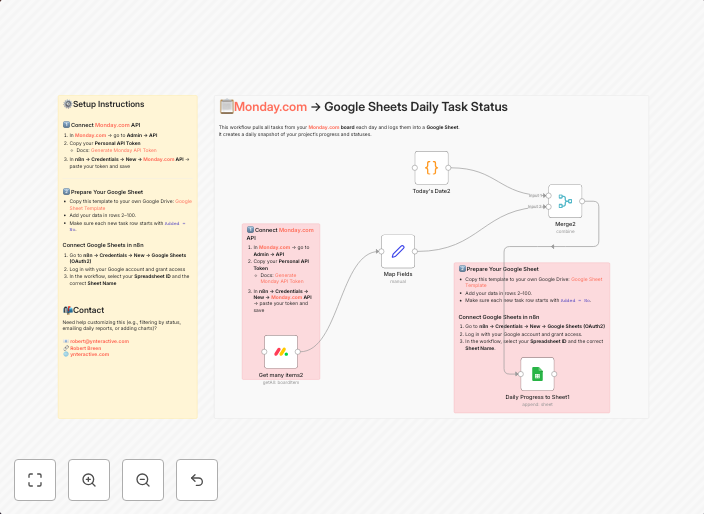
Create daily task status snapshots from Monday.com to Google Sheets
This workflow pulls all tasks from your Monday.com board each day and logs them into a Google Sheet. It creates a daily snapshot of your project’s progress...
Get This WorkflowAbout This Workflow
What This Workflow Does
This workflow automates the process of creating daily task status snapshots from your Monday.com board to a Google Sheet. It retrieves all tasks on a daily basis, providing a real-time update of your project's progress. This ensures that you always have an up-to-date view of your project's status.
Who Should Use This
This workflow is ideal for project managers, developers, and business owners who rely on Monday.com and Google Sheets for project management and tracking. It helps streamline tasks, reduce manual entry, and improve collaboration.
Key Features
- Daily Task Updates: This workflow retrieves all tasks from your Monday.com board on a daily basis, ensuring that your Google Sheet reflects the current project status.
- Automatic Data Logging: Tasks are automatically logged into a Google Sheet, eliminating the need for manual entry and reducing the risk of data discrepancies.
- Real-time Project Tracking: With this workflow, you can easily track project progress and stay up-to-date on the latest developments.
- Customizable Integration: The workflow can be easily customized to fit your specific needs and Monday.com board configuration.
How to Get Started
To get started with this workflow, simply import it into n8n and configure the Monday.com and Google Sheets integrations according to your project's needs. Customize the workflow to fit your specific requirements and enjoy the benefits of automated project tracking.
Use This Workflow in n8n →Similar Workflows




Affiliate Disclosure: We may earn a commission if you sign up for n8n through our links. This doesn't affect our recommendations.