Create Google Calendar events from labeled Gmail emails with Google Gemini AI
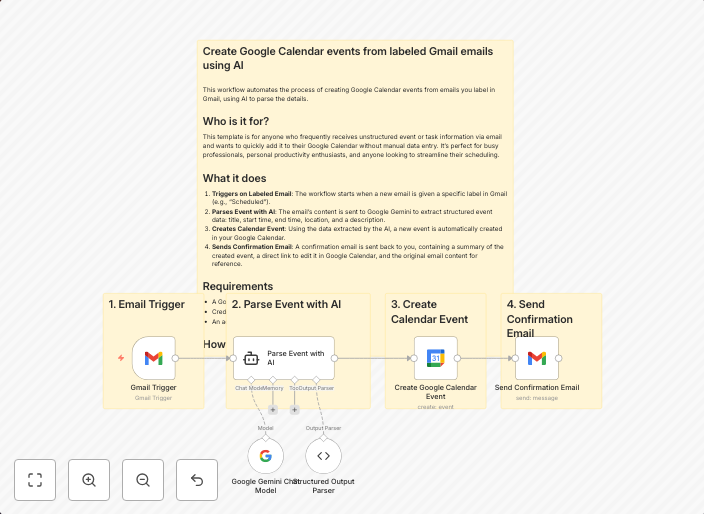
TitleCreate Google Calendar events from labeled Gmail emails using AI DescriptionWho is it for?This template is for anyone who frequently receives...
Get This WorkflowAbout This Workflow
What This Workflow Does
This workflow automates the process of creating Google Calendar events from labeled Gmail emails using Google Gemini AI. It streamlines your email management by leveraging AI to identify relevant emails and schedule them as events on your calendar. The result is a more organized and efficient approach to your schedule.
Who Should Use This
This template is designed for anyone who frequently receives emails that require scheduling, such as meetings, appointments, or deadlines. This includes professionals, business owners, and individuals looking to optimize their email workflow.
Key Features
- Identifies and extracts relevant information from labeled Gmail emails
- Utilizes Google Gemini AI for intelligent email processing and event creation
- Creates Google Calendar events directly from emails
- Automates the scheduling process, saving time and reducing manual effort
- Integrates with Google services for seamless workflow management
How to Get Started
To use this workflow, import it into your n8n account and customize the settings to match your specific Gmail and Google Calendar configurations. Follow the workflow's instructions for setting up the necessary integrations and credentials to get started with automating your email scheduling tasks.
Use This Workflow in n8n →Similar Workflows




Affiliate Disclosure: We may earn a commission if you sign up for n8n through our links. This doesn't affect our recommendations.