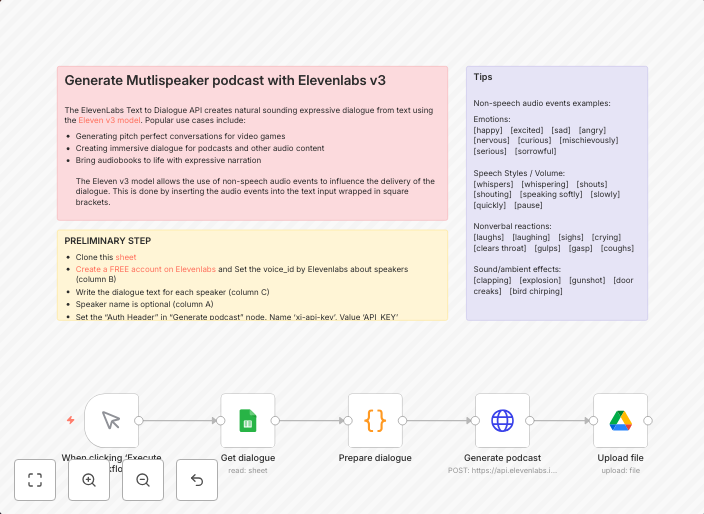
Create multi-speaker podcasts with Google Sheets, ElevenLabs v3, and Drive
This workflow automates the creation of realistic Multi-speaker podcasts using ElevenLabsv3 API by reading a script from Google Sheets and saving the final...
Get This WorkflowAbout This Workflow
What This Workflow Does
This automation workflow, created by Igor Fediczko, uses Google Sheets, ElevenLabs v3, and Google Drive to create realistic multi-speaker podcasts. It reads a script from a Google Sheet and uses the ElevenLabs v3 API to generate a podcast with multiple speakers. The final podcast is then saved to Google Drive.
Who Should Use This
This workflow is ideal for content creators, podcasters, and developers who want to automate the process of creating multi-speaker podcasts. They can save time and effort by using this workflow to generate high-quality podcasts.
Key Features
- Reads a script from a Google Sheet and uses it to generate a podcast with multiple speakers.
- Utilizes the ElevenLabs v3 API to create realistic multi-speaker audio.
- Saves the final podcast to Google Drive for easy access and sharing.
- Automates the creation process, saving time and effort for content creators.
How to Get Started
To use this workflow, simply import it into your n8n account and customize the settings to fit your needs. You can connect your Google Sheets, ElevenLabs v3 API, and Google Drive accounts to the workflow, and then configure the script and podcast settings as desired.
Use This Workflow in n8n →Similar Workflows




Affiliate Disclosure: We may earn a commission if you sign up for n8n through our links. This doesn't affect our recommendations.