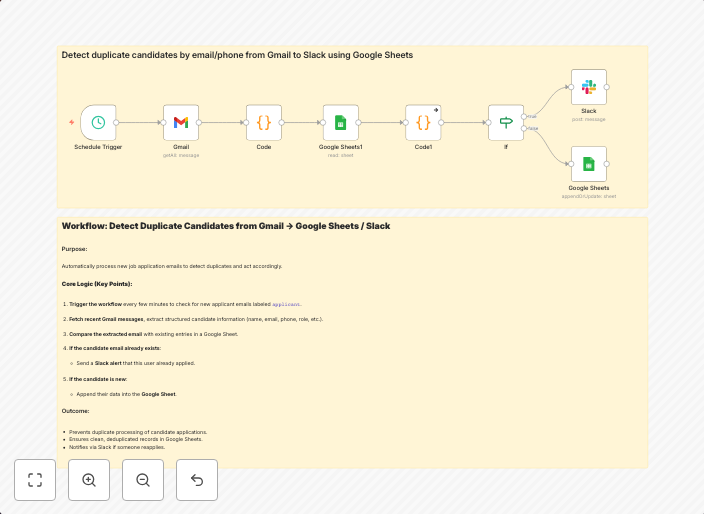
Detect duplicate candidates from Gmail to Slack using Google Sheets
Detect duplicate candidates by email/phone from Gmail to Slack using Google Sheets This workflow automatically detects duplicate job applicants by checking...
Get This WorkflowAbout This Workflow
What This Workflow Does
This workflow automates the detection of duplicate job applicants by checking emails and phone numbers from Gmail and storing the data in a Google Sheets spreadsheet. It then sends notifications to Slack when duplicates are found, helping users streamline their hiring process. This workflow combines data from multiple sources to provide a comprehensive overview of applicants.
Who Should Use This
This workflow is ideal for hiring managers, recruitment teams, and business owners who want to save time and effort in their hiring processes. It's also suitable for anyone using Gmail and Slack for their business operations.
Key Features
- Duplicate detection: The workflow checks for duplicate candidates based on their email or phone number.
- Data storage: Applicant data is stored in a Google Sheets spreadsheet for easy access and analysis.
- Slack notifications: The workflow sends notifications to Slack when duplicates are found, ensuring team members stay informed.
- Integration with Gmail: The workflow connects directly to Gmail, allowing users to access and process email data.
How to Get Started
To use this workflow, simply import it into your n8n account and customize the settings to match your specific requirements. You'll need to connect your Gmail and Slack accounts, as well as set up your Google Sheets spreadsheet, to get started.
Use This Workflow in n8n →Similar Workflows




Affiliate Disclosure: We may earn a commission if you sign up for n8n through our links. This doesn't affect our recommendations.