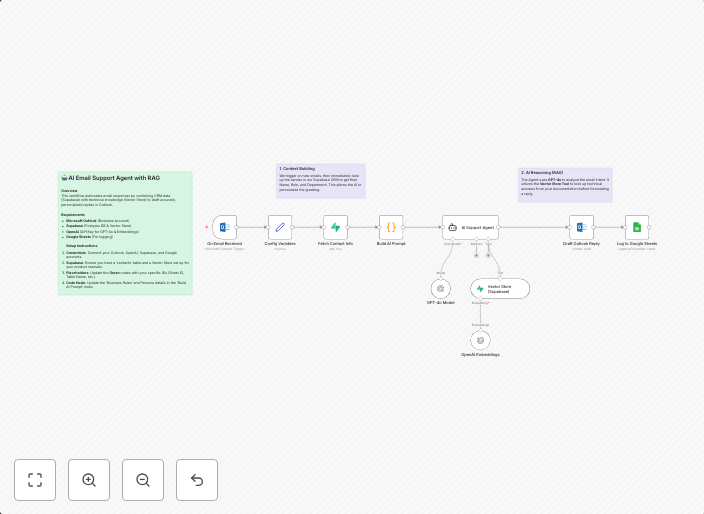
Draft personalized Outlook support email replies with Supabase RAG and OpenAI
DescriptionThis workflow automates the first line of customer support by intelligently drafting email replies. It bridges the gap between your CRM...
Get This WorkflowAbout This Workflow
What This Workflow Does
This workflow automates the drafting of personalized email replies in Outlook by leveraging Supabase's Response And Grading (RAG) system and OpenAI's AI capabilities. It streamlines the first line of customer support, enabling businesses to quickly respond to customer inquiries with tailored messages. By integrating these tools, the workflow enhances the efficiency and effectiveness of support teams.
Who Should Use This
This workflow is ideal for business owners, support managers, and developers who want to improve their customer support processes by automating repetitive tasks and leveraging AI-driven insights.
Key Features
- Personalized Email Replies: The workflow drafts email replies based on customer inquiries, utilizing OpenAI's language generation capabilities.
- Supabase RAG Integration: The workflow incorporates Supabase's Response And Grading system to analyze customer feedback and improve response quality.
- Automated Support Response: The workflow enables businesses to respond to customer inquiries quickly, without manual intervention.
- Customizable Templates: Users can create and customize email templates to suit their brand's tone and style.
How to Get Started
To get started with this workflow, simply import it into your n8n account and customize the settings to fit your business needs. Configure the Supabase and OpenAI integrations according to your preferences, and start automating your support email replies today.
Use This Workflow in n8n →Similar Workflows




Affiliate Disclosure: We may earn a commission if you sign up for n8n through our links. This doesn't affect our recommendations.