Enrich Company Data from LinkedIn via Bright Data & Google Sheets
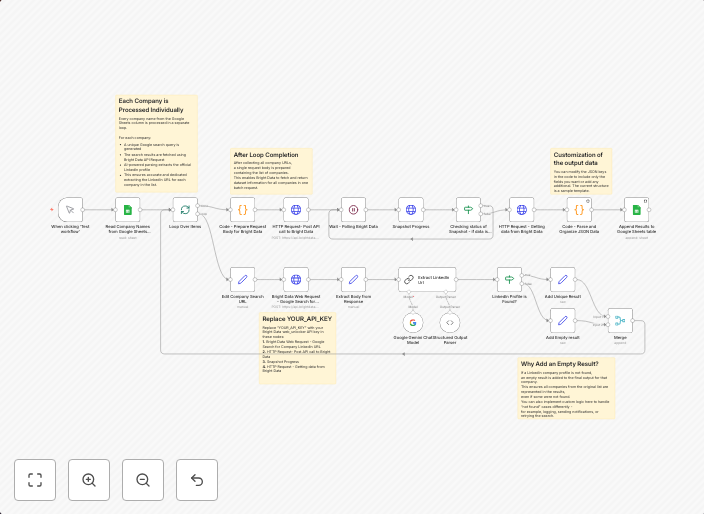
This n8n workflow automates the enrichment of a company list by discovering and extracting each company’s official LinkedIn URL using Bright Data’s search...
Get This WorkflowAbout This Workflow
What This Workflow Does
This n8n workflow automates the enrichment of a company list by discovering and extracting each company's official LinkedIn URL using Bright Data's search capabilities. It integrates with Google Sheets to store and organize the enriched data. By automating this process, users can quickly and efficiently gather valuable information about target companies.
Who Should Use This
This workflow is ideal for marketing teams, sales professionals, and business owners who want to streamline their lead generation and research processes. It's particularly useful for those looking to leverage social media data to inform their business decisions.
Key Features
- LinkedIn URL Discovery: Uses Bright Data's search capabilities to find official LinkedIn URLs for each company in the list.
- Google Sheets Integration: Stores and organizes the enriched data in a Google Sheets spreadsheet for easy access and analysis.
- Automated Data Enrichment: Saves time and effort by automating the process of gathering and organizing company data.
How to Get Started
To use this workflow, simply import it into your n8n account and customize the settings to fit your specific needs. This includes configuring the Bright Data and Google Sheets integrations, as well as updating the company list and LinkedIn search settings.
Use This Workflow in n8n →Similar Workflows




Affiliate Disclosure: We may earn a commission if you sign up for n8n through our links. This doesn't affect our recommendations.