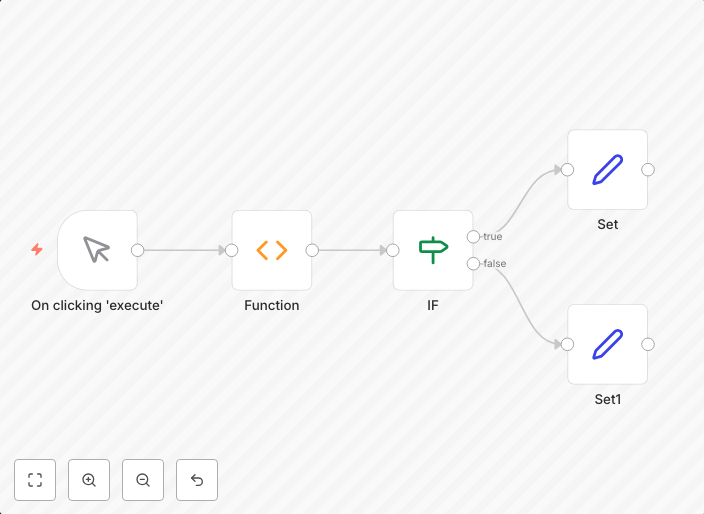
Execute Set node based on Function output
Companion workflow for IF node docs workflow-screenshot
Get This WorkflowAbout This Workflow
What This Workflow Does
This workflow is designed to execute a Set node based on the output of a Function node, allowing for conditional data manipulation and storage. It serves as a companion workflow to the IF node documentation, providing a practical example of how to use function outputs to drive node execution. By automating this process, users can streamline their workflows and improve efficiency.
Who Should Use This
This workflow is ideal for developers, data analysts, and anyone working with n8n who needs to dynamically manipulate data based on function outputs.
Key Features
- Conditional execution of the Set node based on function output
- Dynamic data manipulation using Function node outputs
- Companion workflow to the IF node documentation
- Enhances workflow flexibility and efficiency
How to Get Started
To start using this workflow, simply import it into your n8n instance and customize the Function node to suit your specific data manipulation needs. Adjust the Set node settings as required to store the output data, and then trigger the workflow to see the automation in action.
Use This Workflow in n8n →Similar Workflows




Affiliate Disclosure: We may earn a commission if you sign up for n8n through our links. This doesn't affect our recommendations.