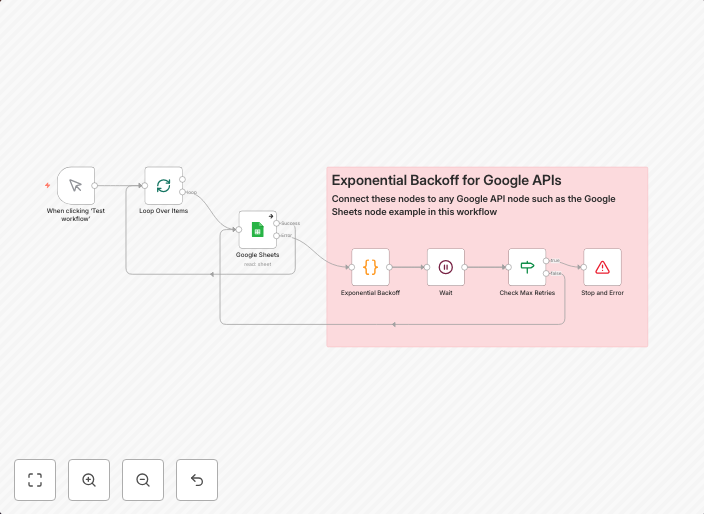
Exponential backoff for Google APIs
n8n Workflow: Exponential Backoff for Google APIs OverviewThis n8n workflow implements an Exponential Backoff mechanism to handle retries when interacting...
Get This WorkflowAbout This Workflow
What This Workflow Does
This n8n workflow implements an Exponential Backoff mechanism to handle retries when interacting with Google APIs. By utilizing an exponential backoff strategy, the workflow helps minimize the impact of API rate limits and temporary errors, ensuring a more reliable connection to Google services. This automation is specifically designed for Google APIs.
Who Should Use This
This workflow is ideal for developers and engineers who work with Google APIs and need to handle API rate limits and temporary errors in a robust and efficient manner.
Key Features
- Exponential Backoff Strategy: Automatically retries API requests with an exponentially increasing delay, reducing the load on the API and minimizing the impact of rate limits.
- Google API Support: Compatible with various Google APIs, including Google Drive, Google Sheets, and Google Maps.
- Customizable Retry Settings: Allows you to adjust the retry policy, including the maximum number of retries, initial delay, and backoff multiplier.
How to Get Started
To use this workflow, simply import it into your n8n instance and customize the workflow by updating the node settings to match your Google API credentials and requirements. Then, integrate the workflow into your existing automation or workflow to start benefiting from the Exponential Backoff mechanism.
Use This Workflow in n8n →Similar Workflows




Affiliate Disclosure: We may earn a commission if you sign up for n8n through our links. This doesn't affect our recommendations.