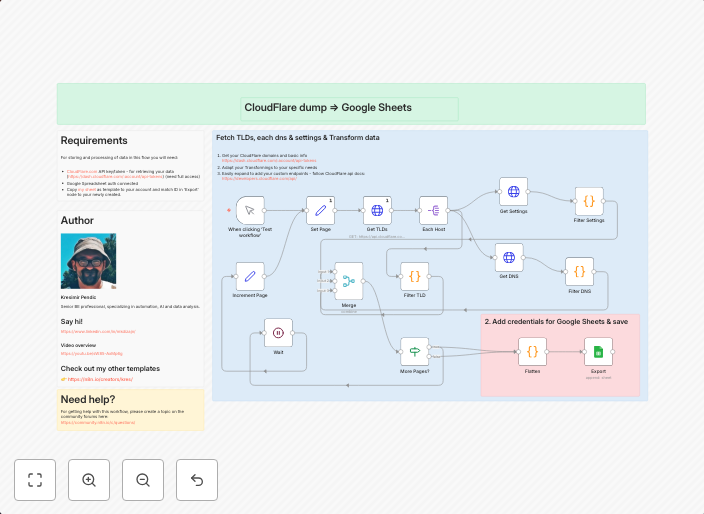
Export Cloudflare domains with DNS records and settings to Google Sheets
How it works This workflow simply exports all your CloudFlare domains to Google Sheet to get high overview of all of your settings. This could help for easy...
Get This WorkflowAbout This Workflow
What This Workflow Does
This n8n automation workflow exports all Cloudflare domains with their associated DNS records and settings to a Google Sheet, providing a comprehensive overview of your domain configurations. This streamlines the process of managing multiple domains, allowing for easier tracking and maintenance of your online presence. The exported data is organized in a structured format, enhancing visibility and accessibility.
Who Should Use This
This workflow is ideal for developers, DevOps professionals, and marketers who manage multiple domains and need to keep track of their settings and DNS records. It's also beneficial for business owners who want to maintain a centralized record of their online presence.
Key Features
- Domain Data Export: Exports all Cloudflare domains with their associated DNS records and settings.
- Structured Data: Organizes the exported data in a Google Sheet, making it easy to view and analyze.
- Centralized Management: Provides a single, up-to-date record of all domains, reducing the need for manual tracking and maintenance.
- Integration with Cloudflare and Google Sheets: Leverages n8n's integrations with Cloudflare and Google Sheets to automate the export process.
How to Get Started
To use this workflow, simply import it into n8n and connect your Cloudflare and Google Sheets accounts. Customize the workflow as needed to fit your specific requirements, and start automating the export of your domain data.
Use This Workflow in n8n →Similar Workflows




Affiliate Disclosure: We may earn a commission if you sign up for n8n through our links. This doesn't affect our recommendations.