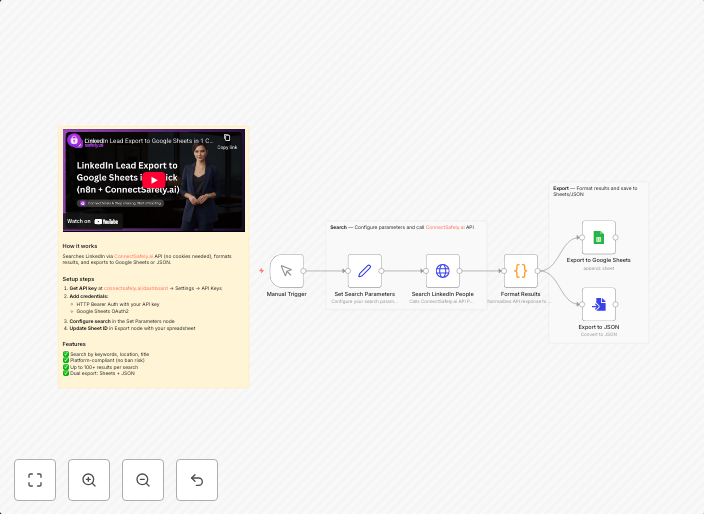
Export LinkedIn search results to Google Sheets using ConnectSafely.ai API
Who's it for This workflow is built for sales professionals, recruiters, founders, and growth marketers who need to build targeted prospect lists from...
Get This WorkflowAbout This Workflow
What This Workflow Does
This workflow automates the process of exporting LinkedIn search results to Google Sheets using the ConnectSafely.ai API. It allows users to fetch targeted prospect lists from LinkedIn and store them in a Google Sheets document for further analysis or lead generation. The workflow streamlines the data import process, saving time and effort for sales professionals, recruiters, and marketing teams.
Who Should Use This
This workflow is ideal for sales professionals, recruiters, founders, and growth marketers who need to build targeted prospect lists from LinkedIn and integrate them with their existing workflows.
Key Features
- Fetches LinkedIn search results using the ConnectSafely.ai API
- Exports the search results to a Google Sheets document for easy analysis and tracking
- Automates the data import process, saving time and effort
- Integrates with Google Sheets for seamless data storage and management
How to Get Started
To get started with this workflow, simply import it into your n8n instance and customize the API credentials and LinkedIn search settings to suit your needs. You can then trigger the workflow to run at regular intervals or on demand, depending on your workflow requirements.
Use This Workflow in n8n →Similar Workflows




Affiliate Disclosure: We may earn a commission if you sign up for n8n through our links. This doesn't affect our recommendations.