Extract and organize receipt data for expense tracking with VLM Run and Google
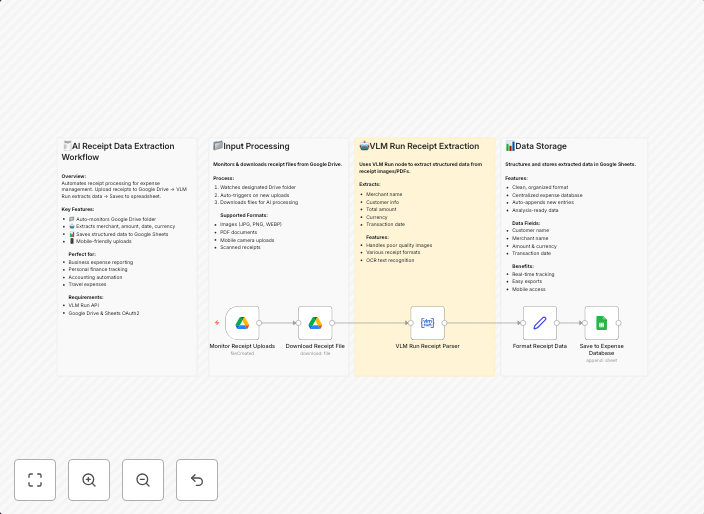
Transform your expense tracking with automated AI receipt processing that extracts data and organizes it instantly. What this workflow does Monitors Google...
Get This WorkflowAbout This Workflow
What This Workflow Does
This workflow uses AI-powered receipt processing to extract and organize data from Google Drive receipts, making expense tracking more efficient and automated. It monitors Google Drive for new files and uses the VLM Run integration to process receipt data, providing a streamlined solution for expense reporting. The workflow then organizes the extracted data, ready for use in expense tracking systems.
Who Should Use This
This workflow is ideal for businesses, entrepreneurs, and individuals who use Google Drive to store receipts and struggle with manual expense tracking. Anyone looking to simplify their expense reporting process and reduce administrative time can benefit from this automation.
Key Features
- Automated Receipt Processing: Extracts data from Google Drive receipts using AI-powered processing.
- Organization of Expense Data: Organizes the extracted data for easy use in expense tracking systems.
- Integration with Google Drive: Monitors Google Drive for new files and integrates with other Google apps for seamless workflow.
- Efficient Expense Tracking: Saves time and reduces administrative costs by automating the expense tracking process.
How to Get Started
To use this workflow, import it into your n8n account and customize the settings to match your Google Drive account and expense tracking system. Follow the workflow's instructions to connect your Google Drive account and VLM Run integration, and then let the workflow automate your expense tracking process.
Use This Workflow in n8n →Similar Workflows




Affiliate Disclosure: We may earn a commission if you sign up for n8n through our links. This doesn't affect our recommendations.