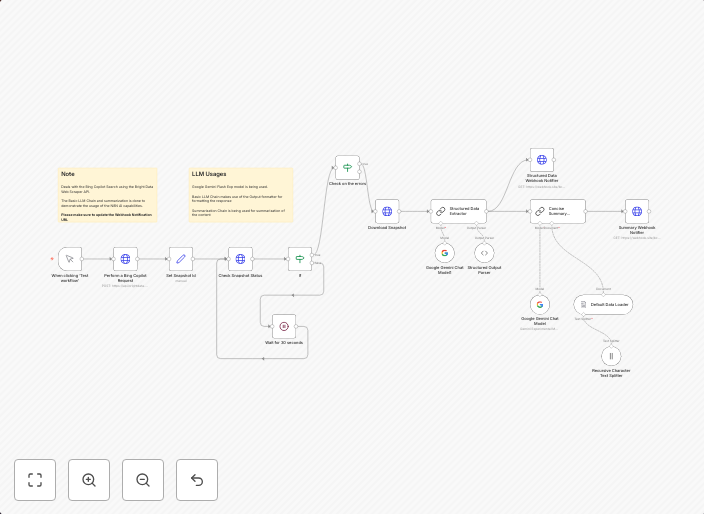
Extract & summarize Bing Copilot search results with Gemini AI and Bright Data
Who is this for?This workflow automates the process of querying Bing's Copilot Search, extracting structured data from the results, summarizing the...
Get This WorkflowAbout This Workflow
What This Workflow Does
This workflow automates the extraction and summarization of Bing Copilot search results using Gemini AI and Bright Data. It queries Bing's Copilot Search, extracts structured data from the results, and summarizes the findings for further analysis. The output provides a concise overview of the search results, making it easier to analyze and understand the data.
Who Should Use This
This workflow is ideal for developers, marketers, and business owners who need to quickly gather and analyze market research data, such as market trends, competitor information, or industry insights.
Key Features
- Queries Bing's Copilot Search to gather relevant data
- Extracts structured data from the search results using Gemini AI
- Summarizes the findings using Gemini AI's summarization capabilities
- Integrates with Bright Data for data extraction and enrichment
How to Get Started
To get started with this workflow, simply import it into your n8n instance, connect to your Bing, Gemini AI, and Bright Data accounts, and customize the workflow to suit your specific needs. Adjust the search query, extraction settings, and summarization options to get the most out of this automation.
Use This Workflow in n8n →Similar Workflows




Affiliate Disclosure: We may earn a commission if you sign up for n8n through our links. This doesn't affect our recommendations.