Extract business emails from Google Maps to Google Sheets for lead generation
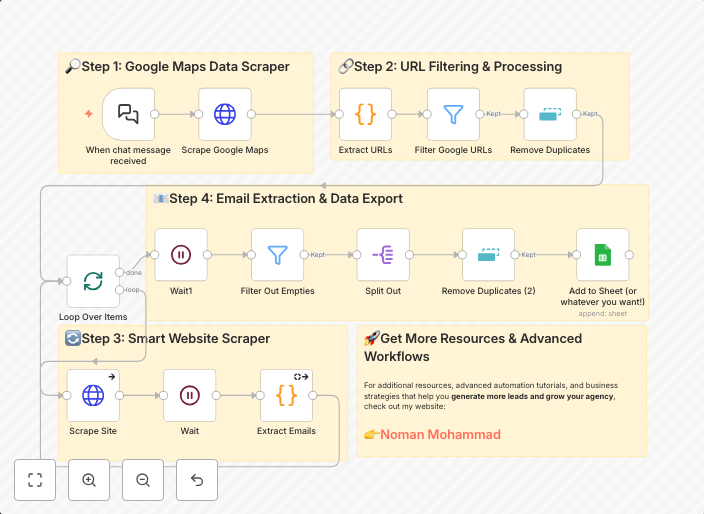
How it Works This workflow builds a free lead generation system that scrapes emails from Google Maps listings and exports them directly into Google Sheets....
Get This WorkflowAbout This Workflow
What This Workflow Does
This workflow automates the process of extracting business emails from Google Maps listings and exports them directly into a Google Sheets document, making it a valuable tool for lead generation. It helps streamline the process of collecting contact information, saving time and effort. By using this workflow, you can easily generate new leads and expand your business network.
Who Should Use This
This workflow is ideal for marketers, business owners, and developers who want to automate the process of lead generation and collect business contact information from Google Maps listings.
Key Features
- Extracts business emails from Google Maps listings: The workflow uses Google Maps API to scrape email addresses from business listings.
- Exports data to Google Sheets: The extracted email addresses are exported directly into a Google Sheets document for easy organization and analysis.
- Multimodal AI integration: The workflow utilizes Multimodal AI to enhance the accuracy of email extraction.
- Lead generation: The workflow helps generate new leads by collecting business contact information from Google Maps listings.
How to Get Started
To use this workflow, simply import it into your n8n account and customize the settings to match your specific needs, such as updating the Google Maps API credentials and selecting the desired Google Sheets document for data export.
Use This Workflow in n8n →Similar Workflows




Affiliate Disclosure: We may earn a commission if you sign up for n8n through our links. This doesn't affect our recommendations.