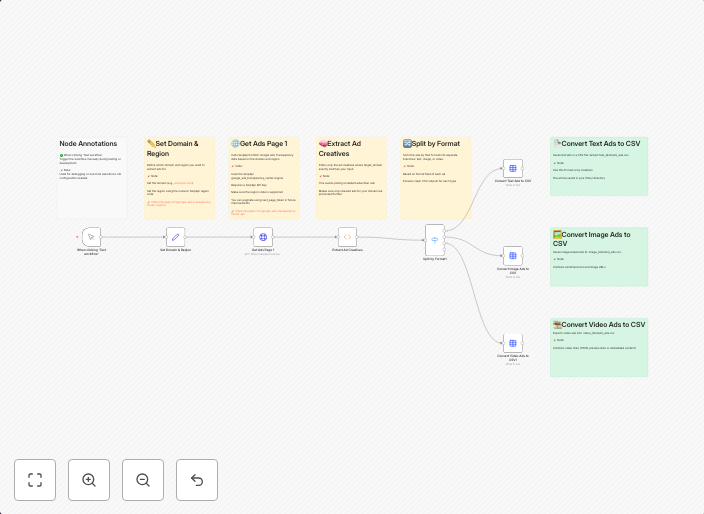
Extract Google Ads creatives by domain with SerpAPI and export to CSV
🧾 Template: Extract Ad Creatives from Google’s Ads Transparency Center This n8n workflow pulls ad creatives from Google's Ads Transparency Center using...
Get This WorkflowAbout This Workflow
What This Workflow Does
This n8n workflow automates the process of extracting ad creatives from Google's Ads Transparency Center using the SerpAPI integration. It filters the results by domain and exports the extracted data to a CSV file. This workflow streamlines ad creative research and analysis for market researchers and marketers.
Who Should Use This
This workflow is designed for marketers, market researchers, and business owners who need to analyze and extract ad creative data from Google's Ads Transparency Center. It's ideal for those who want to save time and effort in gathering and processing ad creative data.
Key Features
- Extracts ad creatives from Google's Ads Transparency Center: The workflow uses SerpAPI to fetch ad creative data from the Ads Transparency Center.
- Filters results by domain: The workflow allows you to specify a domain to filter the ad creative results, making it easier to analyze specific campaigns or brands.
- Exports data to CSV: The extracted ad creative data is exported to a CSV file, making it easy to import into spreadsheets or data analysis tools.
- Integrates with SerpAPI: The workflow leverages the SerpAPI integration to automate the ad creative data extraction process.
How to Get Started
To use this workflow, import it into your n8n instance and customize the SerpAPI credentials and domain filter settings to suit your needs. Then, simply run the workflow to extract and export ad creative data to a CSV file.
Use This Workflow in n8n →Similar Workflows




Affiliate Disclosure: We may earn a commission if you sign up for n8n through our links. This doesn't affect our recommendations.