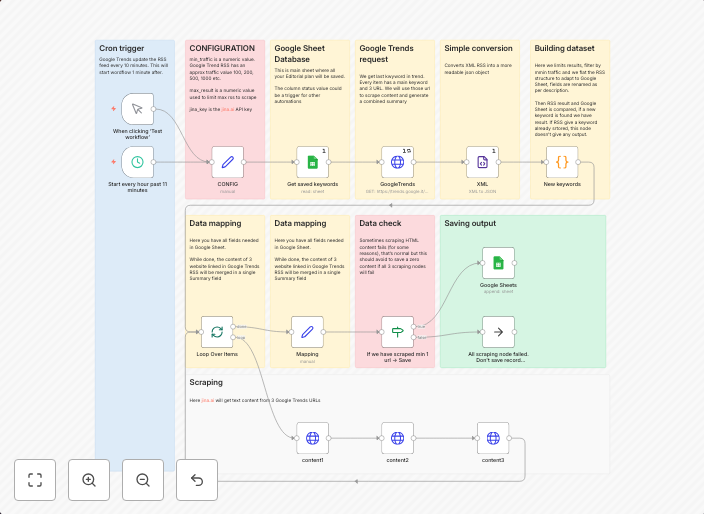
Extract Google Trends keywords & summarize articles in Google Sheets
Stay ahead of trends by automating your content research. This workflow fetches trending keywords from Google Trends RSS, extracts key insights from top...
Get This WorkflowAbout This Workflow
What This Workflow Does
This workflow fetches trending keywords from Google Trends RSS and extracts key insights from top articles. It then summarizes these articles and stores the extracted data in a Google Sheet. By automating this process, users can stay ahead of trends and gain valuable insights for market research and content creation.
Who Should Use This
This workflow is ideal for marketers, business owners, and content creators who want to stay on top of trends and competitor activity, and use this information to inform their content and marketing strategies.
Key Features
- Fetches trending keywords from Google Trends RSS
- Extracts key insights from top articles
- Summarizes articles using AI-powered summarization
- Stores extracted data in a Google Sheet for easy analysis and tracking
How to Get Started
To use this workflow, simply import it into your n8n instance and connect your Google Trends and Google Sheets accounts. Customize the workflow to fit your specific needs by adjusting the settings and parameters as required.
Use This Workflow in n8n →Similar Workflows




Affiliate Disclosure: We may earn a commission if you sign up for n8n through our links. This doesn't affect our recommendations.