Extract Linkedin company data with Airtop
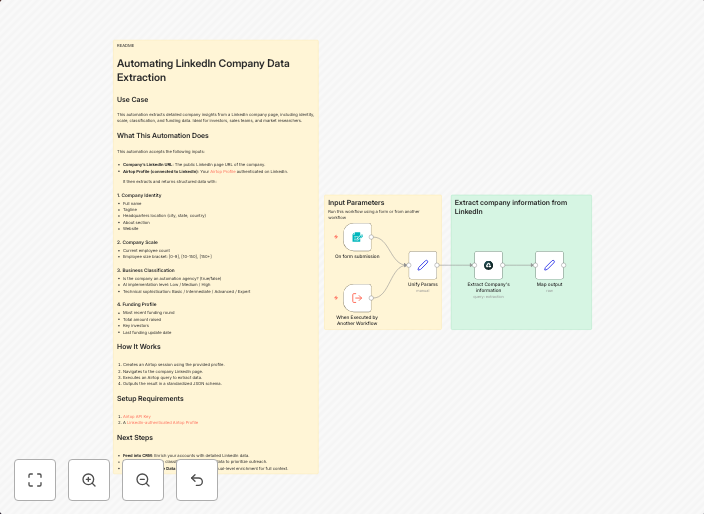
Automating LinkedIn Company Data Extraction Use Case This automation extracts detailed company insights from a LinkedIn company page, including identity,...
Get This WorkflowAbout This Workflow
What This Workflow Does
This workflow automates the extraction of detailed company insights from a LinkedIn company page, including identity, employees, and more. Using the Airtop integration, it retrieves valuable information that can be used for lead generation or business intelligence purposes. The extracted data can be further processed and used in various applications.
Who Should Use This
This workflow is suitable for developers, marketers, and business owners looking to streamline their lead generation efforts or gain deeper insights into companies on LinkedIn. It can be particularly useful for those who need to analyze large volumes of company data.
Key Features
- Extracts company insights from a LinkedIn company page
- Retrieves identity, employees, and other relevant information
- Uses the Airtop integration for seamless data extraction
- Can be customized to fit specific use cases and data requirements
How to Get Started
To use this workflow, simply import it into your n8n instance and customize the integration with your LinkedIn credentials. You can then adjust the workflow to suit your specific needs, such as modifying the data fields or adding additional processing steps.
Use This Workflow in n8n →Similar Workflows




Affiliate Disclosure: We may earn a commission if you sign up for n8n through our links. This doesn't affect our recommendations.