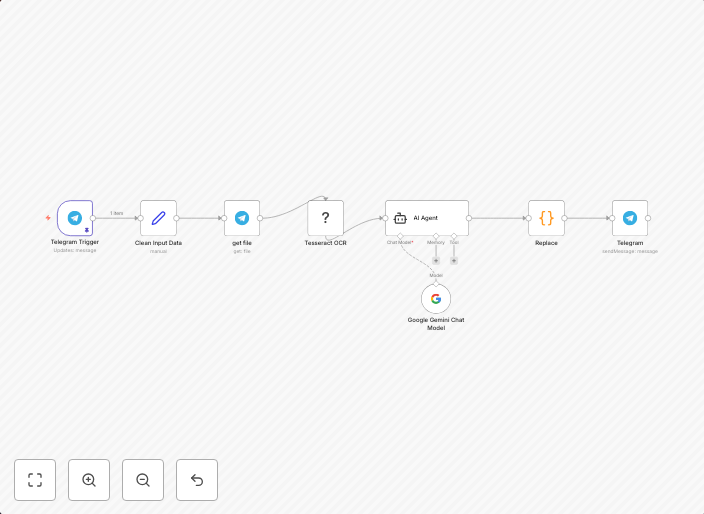
Extract text from images with Telegram Bot & OCR Tesseractjs
DescriptionThis n8n workflow enables users to send an image to a Telegram bot and receive the extracted text using Tesseract OCR (via the...
Get This WorkflowAbout This Workflow
What This Workflow Does
This n8n workflow is designed to extract text from images using Tesseract OCR, allowing users to send an image to a Telegram bot and receive the extracted text as a response. The workflow leverages the capabilities of Tesseractjs to perform Optical Character Recognition (OCR) on the image, enabling text extraction from scanned documents, screenshots, or other image-based content. This automation streamlines the process of converting image-based data into editable text.
Who Should Use This
Developers, marketers, and business owners who frequently work with image-based data can benefit from this workflow. It is ideal for users who need to extract text from images for various purposes, such as data entry, research, or content analysis.
Key Features
- Sends an image to a Telegram bot for OCR processing
- Uses Tesseractjs for Optical Character Recognition (OCR) on the image
- Extracts text from images with high accuracy
- Returns the extracted text as a response from the Telegram bot
How to Get Started
To use this workflow, simply import it into your n8n instance and configure the Telegram bot credentials and Tesseractjs settings according to your requirements. You can then test the workflow by sending an image to the Telegram bot, which will trigger the text extraction process.
Use This Workflow in n8n →Similar Workflows




Affiliate Disclosure: We may earn a commission if you sign up for n8n through our links. This doesn't affect our recommendations.