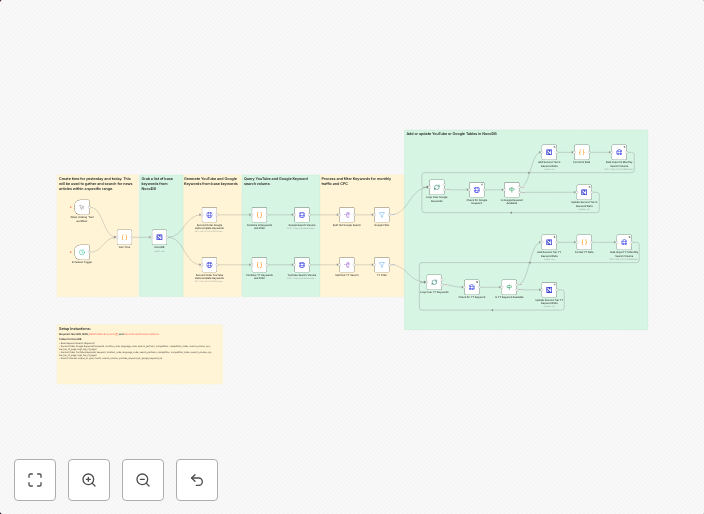
Find top keywords for Youtube and Google and store them in NocoDB
Template Description WDF Top Keywords: This workflow is designed to streamline keyword research by automating the process of generating, filtering, and...
Get This WorkflowAbout This Workflow
What This Workflow Does
This workflow is designed to automate the process of finding top keywords for YouTube and Google, then storing these keywords in NocoDB. It streamlines keyword research by leveraging the power of automation to generate and filter relevant results. The workflow saves time and effort by handling the tedious task of keyword research.
Who Should Use This
This workflow is ideal for marketers, business owners, and developers who need to conduct keyword research for YouTube and Google. It's perfect for those who want to stay ahead in the competitive online market by optimizing their content with the most relevant and top-performing keywords.
Key Features
- Automated search: The workflow uses APIs to search for top keywords on YouTube and Google, ensuring accurate and up-to-date results.
- Filtering functionality: It allows for filtering keywords based on relevance, search volume, and competition, making it easier to identify the most valuable keywords.
- NocoDB integration: The workflow stores the filtered keywords in NocoDB, making it easy to access and manage the data.
How to Get Started
To get started, simply import this workflow into your n8n account and customize the settings to fit your specific needs. Adjust the API credentials, filter criteria, and NocoDB database to ensure seamless integration and accurate results.
Use This Workflow in n8n →Similar Workflows



Affiliate Disclosure: We may earn a commission if you sign up for n8n through our links. This doesn't affect our recommendations.