Gather leads in Google Sheet and Mailchimp
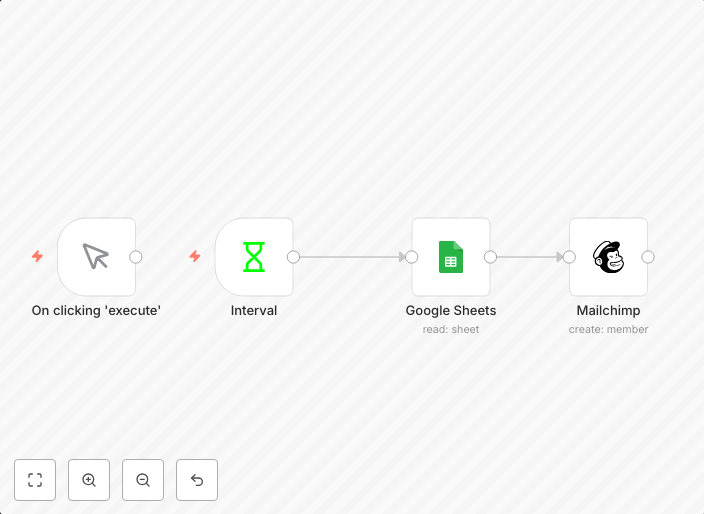
Gather leads into Mailchimp, automate marketing, and sales process. workflow-screenshot
Get This WorkflowAbout This Workflow
What This Workflow Does
This workflow gathers leads from a Google Sheet and automatically adds them to Mailchimp, streamlining your marketing and sales process. It ensures that new leads are added to your Mailchimp list, enabling you to automate email marketing campaigns and follow-up sales actions. By using this workflow, you can save time and effort in managing leads and focus on nurturing them.
Who Should Use This
This workflow is ideal for marketing and sales teams, business owners, and entrepreneurs who want to automate their lead generation and email marketing processes. It's perfect for those who use Google Sheets to store their leads and Mailchimp for email marketing campaigns.
Key Features
- Automated lead import: New leads are added to Mailchimp from the Google Sheet in real-time.
- Real-time lead synchronization: Leads are updated in Mailchimp whenever changes are made to the Google Sheet.
- Customizable settings: You can adjust the workflow to suit your specific lead generation and email marketing needs.
How to Get Started
To get started with this workflow, import it into your n8n account and customize the settings to match your Google Sheet and Mailchimp account details. From there, you can test the workflow and make adjustments as needed to ensure seamless automation of your lead generation and email marketing processes.
Use This Workflow in n8n →Similar Workflows




Affiliate Disclosure: We may earn a commission if you sign up for n8n through our links. This doesn't affect our recommendations.