Gathering tasks in Typeform and send to ClickUp
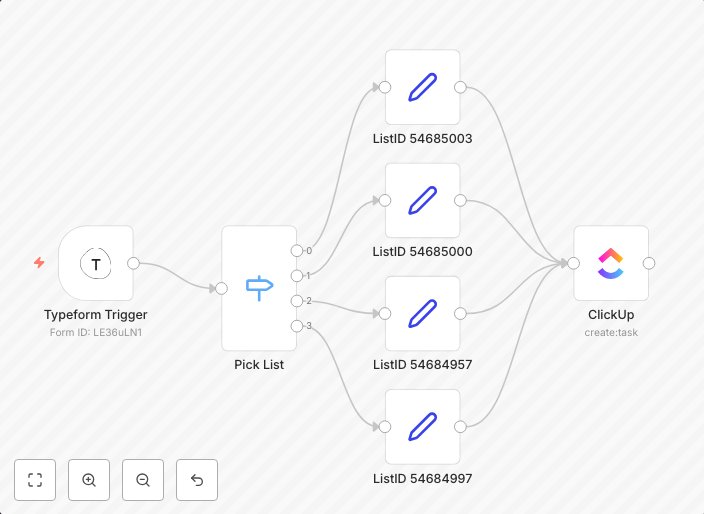
Using Typeform to push task requests to an n8n webhook that then categorizes the request and assigns it in ClickUp accordingly. In order to get his workflow...
Get This WorkflowAbout This Workflow
What This Workflow Does
This n8n automation workflow gathers task requests from Typeform and sends them to ClickUp for categorization and assignment. It enables seamless task management by automating the process of collecting and distributing tasks from one platform to another. The workflow ensures accurate and efficient task allocation, saving time and reducing manual errors.
Who Should Use This
This workflow is ideal for project managers, team leaders, and business owners who rely on Typeform for collecting task requests and ClickUp for managing tasks and projects. It simplifies the task management process and streamlines workflows.
Key Features
- Automated Task Collection: Tasks are collected from Typeform webhooks and processed in n8n.
- Task Categorization: Tasks are categorized and assigned to respective projects in ClickUp based on specific criteria.
- Efficient Task Management: The workflow ensures that tasks are accurately allocated to the right projects, reducing manual errors and increasing productivity.
- Real-time Task Updates: Tasks are updated in real-time within ClickUp, enabling team members to stay informed and focused.
How to Get Started
To use this workflow, simply import it into your n8n instance and customize the settings to match your Typeform and ClickUp integrations. Configure the webhook and API connections to ensure seamless communication between the three platforms, and start automating your task management process.
Use This Workflow in n8n →Similar Workflows


Affiliate Disclosure: We may earn a commission if you sign up for n8n through our links. This doesn't affect our recommendations.