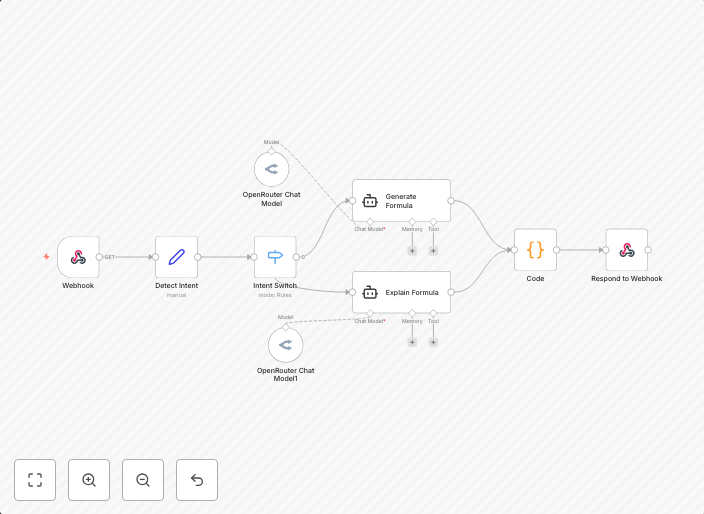
Generate & explain Excel/Google Sheets formulas with DeepSeek AI
Description This AI-powered n8n workflow helps users generate or explain complex Excel/Google Sheets/R and Math formulas with a simple text prompt. Whether...
Get This WorkflowAbout This Workflow
What This Workflow Does
This AI-powered n8n workflow, "Generate & explain Excel/Google Sheets formulas with DeepSeek AI", automates the process of generating or explaining complex Excel, Google Sheets, R, and Math formulas using a simple text prompt. It utilizes DeepSeek AI to provide users with accurate and detailed explanations for their formulas. This workflow streamlines the process of formula creation and understanding, saving time and effort.
Who Should Use This
This workflow is ideal for users who frequently work with formulas in spreadsheets, including data analysts, finance professionals, marketers, and anyone who needs to create or understand complex formulas. It is also useful for developers and business owners who want to automate tasks related to formula generation and explanation.
Key Features
- Generates accurate formulas for Excel, Google Sheets, R, and Math using a simple text prompt.
- Provides detailed explanations for the generated formulas, including step-by-step calculations and logic.
- Utilizes AI-powered DeepSeek AI for formula creation and explanation.
- Supports multiple spreadsheet formats, including Excel and Google Sheets.
How to Get Started
To use this workflow, simply import it into your n8n account and connect it to your preferred integration. Customize the workflow as needed by adjusting the input prompt and formula settings. Once set up, you can use the workflow to generate and explain complex formulas with ease.
Use This Workflow in n8n →Similar Workflows




Affiliate Disclosure: We may earn a commission if you sign up for n8n through our links. This doesn't affect our recommendations.