Generate ASO reports from Google Play Apps with Gemini AI & Google Docs
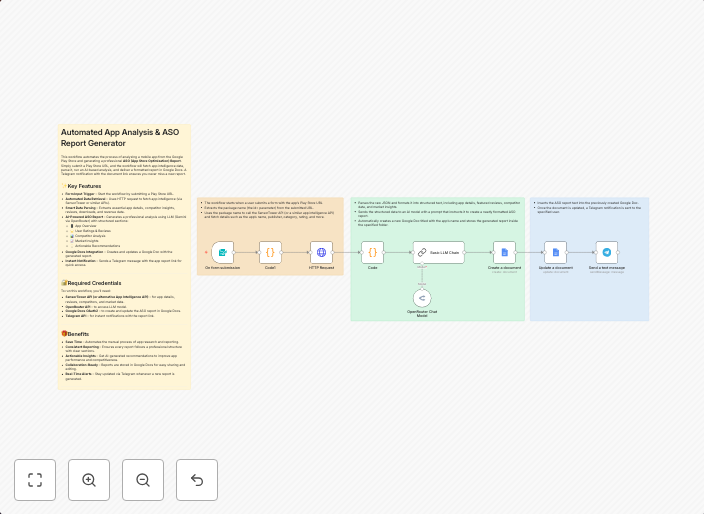
Automated App Analysis & ASO Report Generator This workflow automates the process of analyzing a mobile app from the Google Play Store and generating a...
Get This WorkflowAbout This Workflow
What This Workflow Does
This workflow automates the process of generating ASO (App Store Optimization) reports for mobile apps listed on the Google Play Store. It utilizes Gemini AI for in-depth analysis and Google Docs for report generation, saving time and effort for developers and marketers. By streamlining the report generation process, this workflow enables users to focus on data-driven insights and optimization strategies.
Who Should Use This
This workflow is ideal for mobile app developers, marketers, and business owners who want to optimize their app's visibility and performance on the Google Play Store. It's particularly useful for those who need regular ASO reports to track their app's progress and make data-driven decisions.
Key Features
- Automated App Analysis: Utilizes Gemini AI to analyze mobile apps from the Google Play Store, providing in-depth insights into performance and optimization opportunities.
- ASO Report Generation: Automatically generates reports in Google Docs, saving time and effort for users.
- Integration with Google Play Store: Directly integrates with the Google Play Store, allowing users to analyze and generate reports for their apps with ease.
How to Get Started
To use this workflow, simply import it into your n8n account and customize the settings to fit your specific needs. You can then connect your Google Play Store account and Google Docs account to the workflow, and start generating ASO reports for your mobile apps.
Use This Workflow in n8n →Similar Workflows




Affiliate Disclosure: We may earn a commission if you sign up for n8n through our links. This doesn't affect our recommendations.