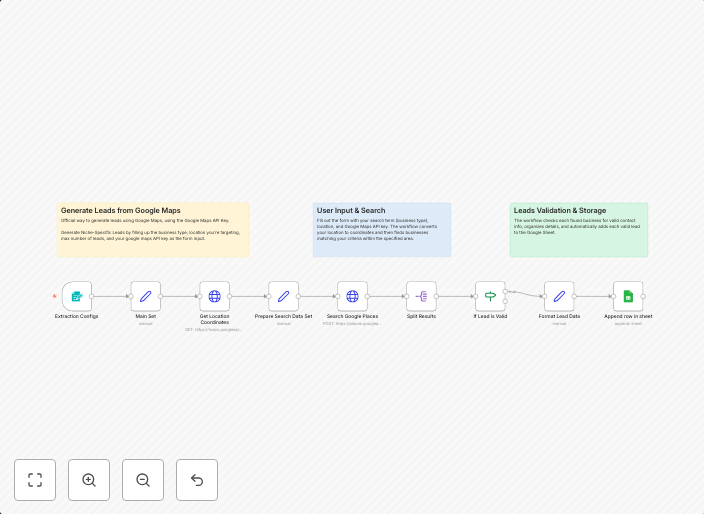
Generate business leads from Google Maps & Places API to Google Sheets
Overview This workflow automates the process of generating niche-specific business leads from Google Maps, leveraging the Google Places API and Google...
Get This WorkflowAbout This Workflow
What This Workflow Does
This workflow automates the process of generating niche-specific business leads from Google Maps, using the Google Places API and Google Sheets integration. It extracts relevant business information, such as name, address, and category, and stores it in a Google Sheets document for further analysis. The workflow saves time and effort by automating the tedious task of manual data collection.
Who Should Use This
This workflow is ideal for business owners, marketers, and developers who want to generate high-quality leads for their industry-specific businesses. It's perfect for those who need to quickly gather and analyze data on local businesses, such as competitors, potential partners, or clients.
Key Features
- Extracts business data from Google Maps using the Google Places API
- Filters leads based on niche-specific categories and locations
- Stores extracted data in a Google Sheets document for easy analysis and tracking
- Automates data collection, saving time and effort for users
How to Get Started
To get started with this workflow, simply import it into your n8n account and customize the nodes to fit your specific business needs. You can update the Google Places API settings, adjust the filtering criteria, and connect your Google Sheets account to start generating leads right away.
Use This Workflow in n8n →Similar Workflows




Affiliate Disclosure: We may earn a commission if you sign up for n8n through our links. This doesn't affect our recommendations.