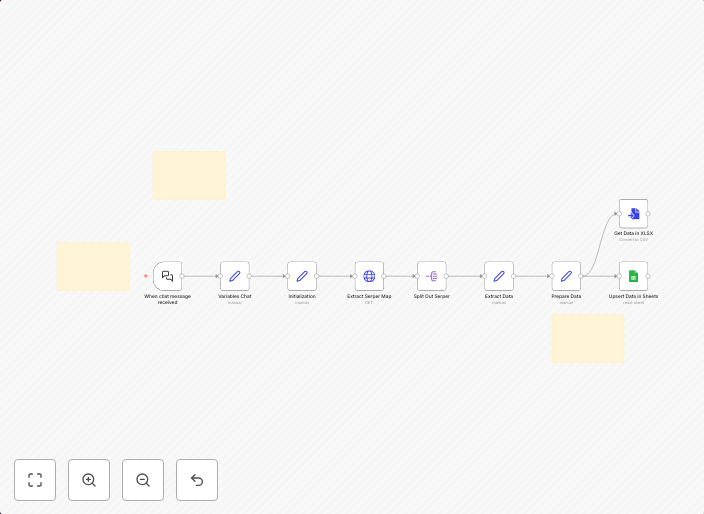
Generate business lists from Google Maps search to Sheets or Excel with Serper
Who is this forThis workflow is ideal for lead generation agencies, researchers, and small business owners who need to quickly collect and analyze company...
Get This WorkflowAbout This Workflow
What This Workflow Does
This workflow automates the process of generating business lists from Google Maps search results and exporting them to Sheets or Excel using Serper. It quickly collects and analyzes company information, making it ideal for lead generation agencies, researchers, and small business owners. This automation streamlines the data collection process, saving time and effort.
Who Should Use This
This workflow is designed for lead generation agencies, researchers, and small business owners who need to quickly collect and analyze company data. It's perfect for those who want to efficiently manage their lead generation process and gain valuable insights into their target market.
Key Features
- Automated data collection: The workflow collects company information from Google Maps search results, saving time and effort.
- Export to Sheets or Excel: The generated business lists can be exported to Sheets or Excel for further analysis and manipulation.
- Serper integration: The workflow utilizes Serper to collect data from Google Maps, providing accurate and up-to-date results.
- Customizable output: The automation can be tailored to meet specific needs by adjusting the output format and fields.
How to Get Started
To start using this workflow, simply import it into your n8n instance and customize the settings to suit your requirements. This may involve adjusting the Google Maps search query, selecting the desired output format, and setting up the Serper integration.
Use This Workflow in n8n →Similar Workflows




Affiliate Disclosure: We may earn a commission if you sign up for n8n through our links. This doesn't affect our recommendations.