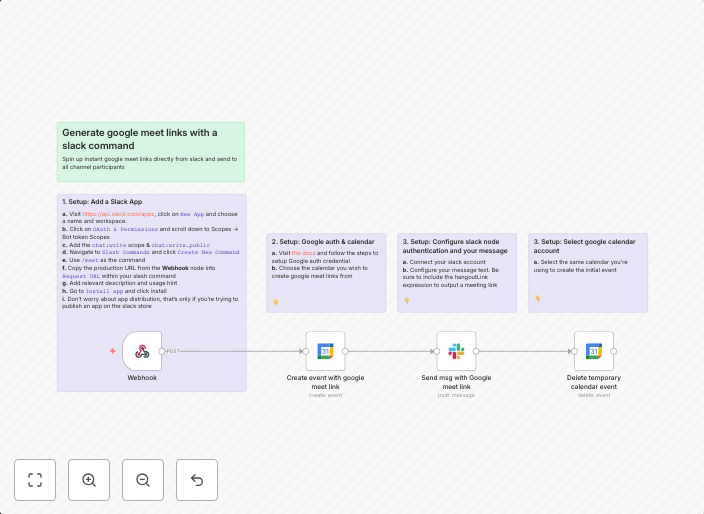
Generate instant google meet links with a slack command
How it worksThis template uses a slack app to connect with your google calendar, generate an instant google meet link and post it as a message in a slack...
Get This WorkflowAbout This Workflow
What This Workflow Does
This workflow generates instant Google Meet links using a Slack command, allowing you to easily schedule and share meetings with others. It integrates with your Google Calendar to retrieve relevant meeting information and create a direct link to join the meeting. The generated link is then posted as a message in a Slack channel.
Who Should Use This
This workflow is ideal for remote teams, freelancers, and individuals who frequently use Google Meet for meetings and want to streamline their scheduling process. It's also suitable for businesses looking to enhance their productivity and communication through automation.
Key Features
- Integrates with Google Calendar to retrieve meeting information
- Generates instant Google Meet links with one Slack command
- Posts the link as a message in a designated Slack channel
- Automatically connects with your Google Calendar account via Slack app
How to Get Started
To use this workflow, import it into your n8n account and customize the Slack app connection and Google Calendar integration to match your specific setup. Follow the on-screen instructions to set up the workflow and start generating instant Google Meet links with your Slack command.
Use This Workflow in n8n →Similar Workflows



Affiliate Disclosure: We may earn a commission if you sign up for n8n through our links. This doesn't affect our recommendations.