Generate invoices for customers with Jotform and QuickBooks
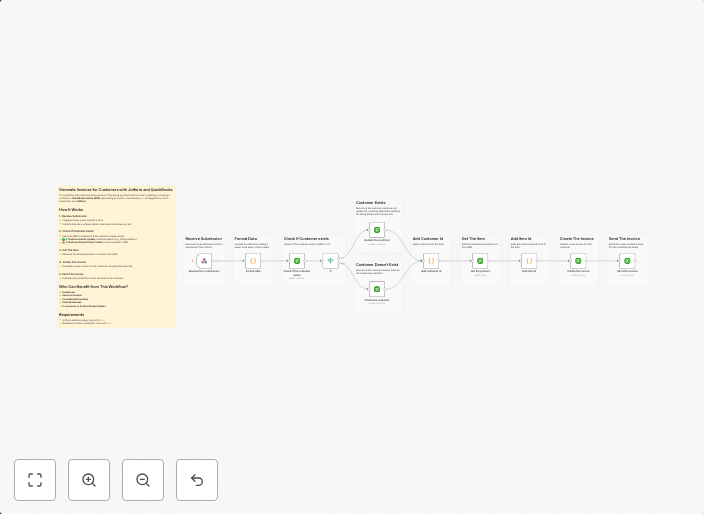
Generate Invoices for Customers with Jotform and QuickBooks This workflow automates the entire process of receiving a product/service order, checking or...
Get This WorkflowAbout This Workflow
What This Workflow Does
This workflow automates the process of generating invoices for customers by integrating with Jotform and QuickBooks. It receives product/service orders, checks for payment confirmation, and creates invoices in QuickBooks. This streamlines the invoicing process, reducing manual effort and minimizing errors.
Who Should Use This
This workflow is ideal for business owners, accountants, and administrators who rely on QuickBooks for financial management and Jotform for form submissions. It's suitable for small to medium-sized businesses that require automated invoicing and seamless integration between forms and accounting systems.
Key Features
- Automated Invoice Creation: The workflow generates invoices in QuickBooks based on form submissions from Jotform.
- Payment Confirmation: It checks for payment confirmation from Jotform before creating an invoice in QuickBooks.
- Real-time Integration: The workflow integrates Jotform and QuickBooks in real-time, ensuring that invoices are up-to-date and accurate.
- Error Reduction: The automation minimizes errors and manual effort, freeing up staff to focus on other tasks.
How to Get Started
To use this workflow, simply import it into your n8n account and customize the settings to match your Jotform and QuickBooks integrations. From there, you can easily automate your invoicing process and enjoy the benefits of streamlined financial management.
Use This Workflow in n8n →Similar Workflows


Affiliate Disclosure: We may earn a commission if you sign up for n8n through our links. This doesn't affect our recommendations.