Generate marketing campaign ROI reports with Google Sheets, GPT-4o and Email
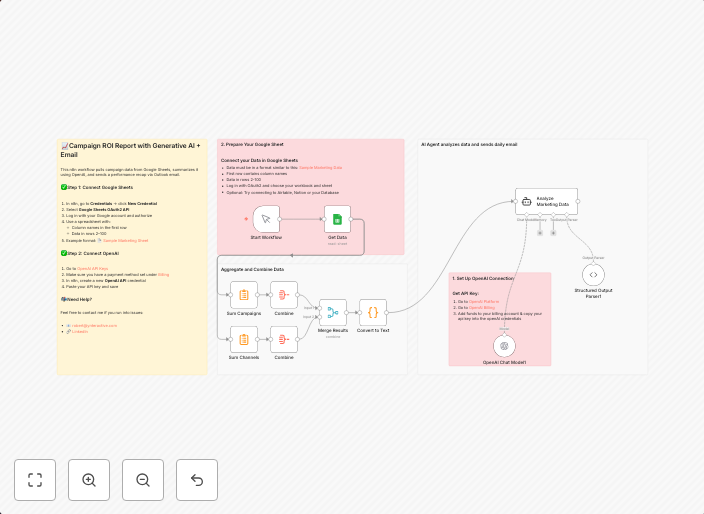
This n8n workflow pulls campaign data from Google Sheets, summarizes it using OpenAI, and sends a performance recap via Outlook email. ✅ Step 1: Connect...
Get This WorkflowAbout This Workflow
What This Workflow Does
This n8n automation workflow generates marketing campaign ROI reports by pulling campaign data from Google Sheets, summarizing it using OpenAI's GPT-4 model, and sending a performance recap via Outlook email. The workflow provides a comprehensive report on campaign performance, saving time and effort for marketers and business owners. It's an all-in-one solution for campaign analytics and reporting.
Who Should Use This
This workflow is ideal for marketers, business owners, and developers who want to streamline their marketing campaign analytics and reporting processes. It's perfect for those who use Google Sheets for campaign data management and Outlook for email communication.
Key Features
- Campaign Data Retrieval: Pulls campaign data from Google Sheets, including performance metrics and metrics of your choice.
- AI-powered Summary: Uses OpenAI's GPT-4 model to summarize campaign data, providing a concise and actionable report.
- Automated Email Reporting: Sends a performance recap via Outlook email, keeping stakeholders informed about campaign progress.
How to Get Started
To use this workflow, import it into your n8n account and customize the Google Sheets and Outlook connections to fit your specific needs. Configure the workflow settings to match your campaign data and reporting preferences, and get started with automated marketing campaign ROI reports.
Use This Workflow in n8n →Similar Workflows




Affiliate Disclosure: We may earn a commission if you sign up for n8n through our links. This doesn't affect our recommendations.