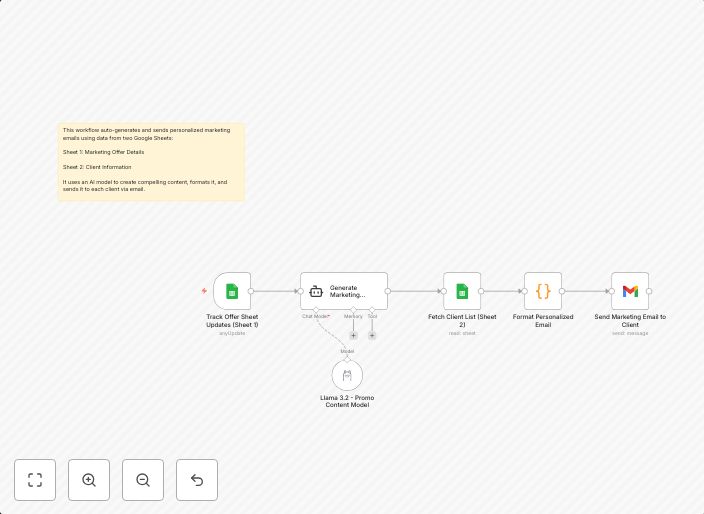
Generate personalized marketing emails from Google Sheets with Llama AI
An AI-powered email marketing automation workflow that generates personalized marketing emails using data from Google Sheets and delivers them directly to...
Get This WorkflowAbout This Workflow
What This Workflow Does
This n8n automation workflow uses Llama AI to generate personalized marketing emails directly from data in a Google Sheets spreadsheet. It automates the process of creating tailored email campaigns based on specific customer segments, streamlining your marketing efforts. By leveraging AI and spreadsheet data, you can save time and increase the effectiveness of your email marketing campaigns.
Who Should Use This
This workflow is ideal for marketers, business owners, and developers looking to automate email marketing campaigns, personalize customer communications, and boost engagement with their target audience.
Key Features
- AI-powered email generation: Automatically generate personalized email content using Llama AI and data from your Google Sheets spreadsheet.
- Segmented email campaigns: Send targeted emails to specific customer segments based on your spreadsheet data.
- Direct email delivery: Deliver emails directly from n8n without needing to export data or manually send emails from other platforms.
- Dynamic content: Use dynamic content from your spreadsheet to create unique and personalized emails for each recipient.
How to Get Started
To use this workflow, simply import it into your n8n account, connect your Google Sheets spreadsheet and Llama AI credentials, and customize the workflow to fit your specific email marketing needs. From there, you can start generating and sending personalized marketing emails to your customers and prospects.
Use This Workflow in n8n →Similar Workflows




Affiliate Disclosure: We may earn a commission if you sign up for n8n through our links. This doesn't affect our recommendations.