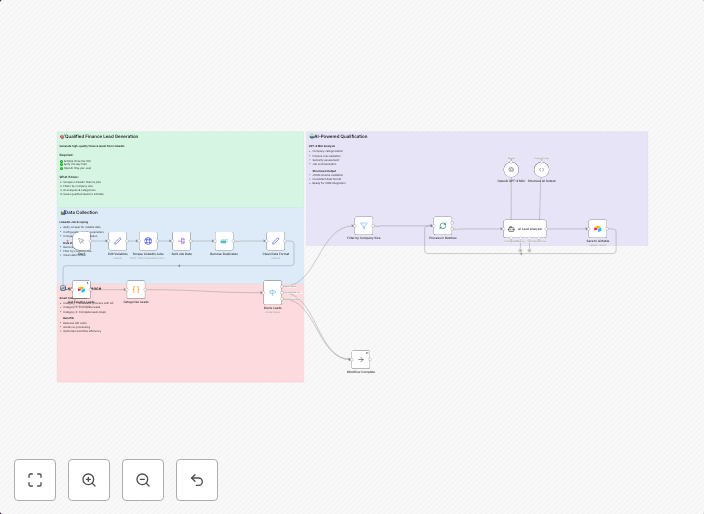
Generate qualified leads from LinkedIn with Apify, GPT-4, and Airtable
Who is this for? This workflow is perfect for sales teams, business development professionals, recruitment agencies, and fractional CFO service providers...
Get This WorkflowAbout This Workflow
What This Workflow Does
This workflow generates qualified leads from LinkedIn using Apify, GPT-4, and Airtable. It automates the process of scraping LinkedIn profiles, analyzing them with AI-powered natural language processing, and storing the relevant information in Airtable. The result is a streamlined lead generation process that saves time and increases efficiency.
Who Should Use This
This workflow is perfect for sales teams, business development professionals, recruitment agencies, and fractional CFO service providers who want to automate their LinkedIn lead generation process and focus on high-value tasks.
Key Features
- LinkedIn Profile Scraping: Quickly collects data from LinkedIn profiles using Apify.
- AI-Powered Analysis with GPT-4: Uses GPT-4 to analyze and summarize the scraped data, extracting key information such as company, job title, and industry.
- Lead Data Storage in Airtable: Stores the analyzed data in Airtable, making it easy to manage and filter leads.
- Automated Lead Qualification: Automatically qualifies leads based on pre-set criteria, ensuring that high-quality leads are prioritized.
How to Get Started
To use this workflow, simply import it into your n8n account, customize the settings to fit your specific needs, and connect your Apify, GPT-4, and Airtable accounts. With minimal setup, you'll be generating qualified leads from LinkedIn in no time.
Use This Workflow in n8n →Similar Workflows




Affiliate Disclosure: We may earn a commission if you sign up for n8n through our links. This doesn't affect our recommendations.