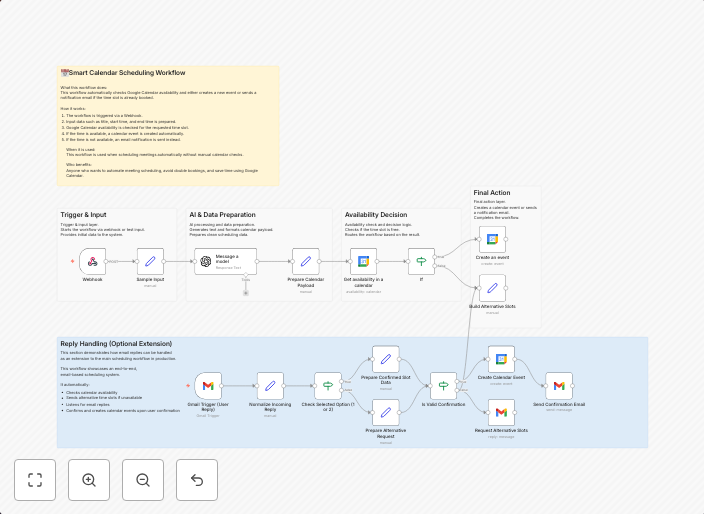
Handle Gmail reply-based scheduling with Google Calendar and GPT-4o-mini
Reply Handling (Optional Extension) This optional workflow handles email replies after availability options have been sent. It extends the main scheduling...
Get This WorkflowAbout This Workflow
What This Workflow Does
This workflow is designed to handle email replies after availability options have been sent, extending the main scheduling functionality in Google Calendar. It integrates with Gmail and GPT-4o-mini to automate the scheduling process. This workflow helps users efficiently manage their schedules by automatically updating Google Calendar with new meeting requests.
Who Should Use This
This workflow is ideal for individuals and businesses that rely heavily on email communication for scheduling meetings or appointments, such as sales teams, customer support agents, or event planners.
Key Features
- Handles email replies after sending availability options
- Integrates with Gmail for seamless email management
- Utilizes GPT-4o-mini for advanced automation capabilities
- Updates Google Calendar with new meeting requests
How to Get Started
To use this workflow, simply import it into your n8n instance and customize the Gmail and Google Calendar credentials to fit your needs. Then, set up the workflow to trigger on incoming email replies, and watch as your Google Calendar is automatically updated with new meeting requests.
Use This Workflow in n8n →Similar Workflows




Affiliate Disclosure: We may earn a commission if you sign up for n8n through our links. This doesn't affect our recommendations.