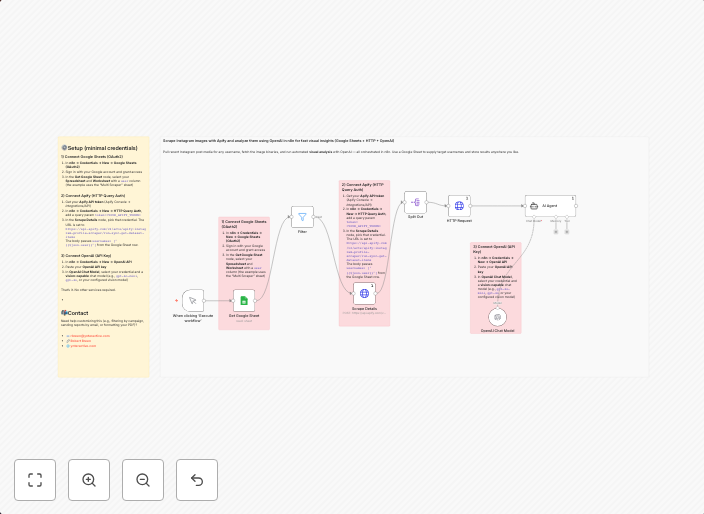
Instagram visual analysis with Apify scraping, OpenAI GPT-5 & Google Sheets
Pull recent Instagram post media for any username, fetch the image binaries, and run automated visual analysis with OpenAI — all orchestrated inside n8n....
Get This WorkflowAbout This Workflow
What This Workflow Does
This workflow automates the process of pulling recent Instagram post media for any username, fetching the image binaries, and running automated visual analysis using OpenAI's GPT-5 language model. The analyzed data is then stored in a Google Sheets document, making it easily accessible for further analysis and insights. This workflow is designed to streamline market research and visual analysis processes for businesses and marketers.
Who Should Use This
This workflow is ideal for developers, marketers, and business owners who need to conduct market research, analyze visual content, and track brand performance on Instagram. It's perfect for anyone looking to save time and automate repetitive tasks.
Key Features
- Instagram Post Scraping: Pulls recent Instagram post media for any username, including images and captions.
- Image Binary Fetching: Retrieves image binaries from the scraped posts, making them available for further analysis.
- OpenAI GPT-5 Analysis: Runs automated visual analysis using OpenAI's GPT-5 language model, providing insights and data for further analysis.
- Google Sheets Integration: Stores analyzed data in a Google Sheets document, making it easily accessible and shareable.
How to Get Started
To use this workflow, simply import it into your n8n account and customize it by setting up your Instagram credentials, OpenAI API key, and Google Sheets document. From there, you can easily modify the workflow to suit your specific needs and start automating your market research and visual analysis processes.
Use This Workflow in n8n →Similar Workflows




Affiliate Disclosure: We may earn a commission if you sign up for n8n through our links. This doesn't affect our recommendations.