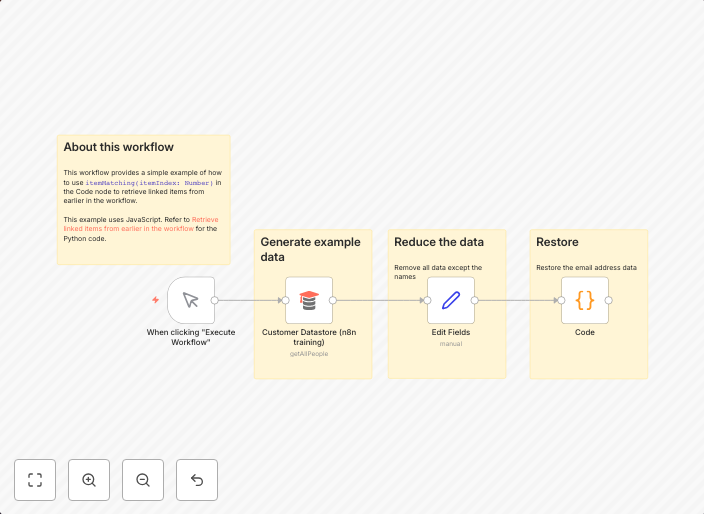
itemMatching() usage example
This workflow provides a simple example of how to use itemMatching(itemIndex: Number) in the Code node to retrieve linked items from earlier in the workflow.
Get This WorkflowAbout This Workflow
What This Workflow Does
This workflow demonstrates the usage of the `itemMatching(itemIndex: Number)` function in the Code node to retrieve linked items from earlier in the workflow. It showcases a simple example of how to implement this feature in n8n. By using this workflow, users can learn how to efficiently retrieve and process linked items in their automation.
Who Should Use This
This workflow is designed for developers who want to understand how to use `itemMatching(itemIndex: Number)` in their n8n workflows. It's particularly useful for those working with linked items and wanting to streamline their data processing and automation.
Key Features
- Retrieves linked items from earlier in the workflow using the `itemMatching(itemIndex: Number)` function.
- Demonstrates how to use this function in the Code node for efficient data processing.
- Provides a simple example of implementing this feature in n8n.
- Allows users to adapt the workflow to their specific automation needs.
How to Get Started
To use this workflow, simply import it into your n8n instance and customize it according to your specific requirements. Follow the provided instructions to set up the workflow and start retrieving linked items in your automation.
Use This Workflow in n8n →Similar Workflows




Affiliate Disclosure: We may earn a commission if you sign up for n8n through our links. This doesn't affect our recommendations.