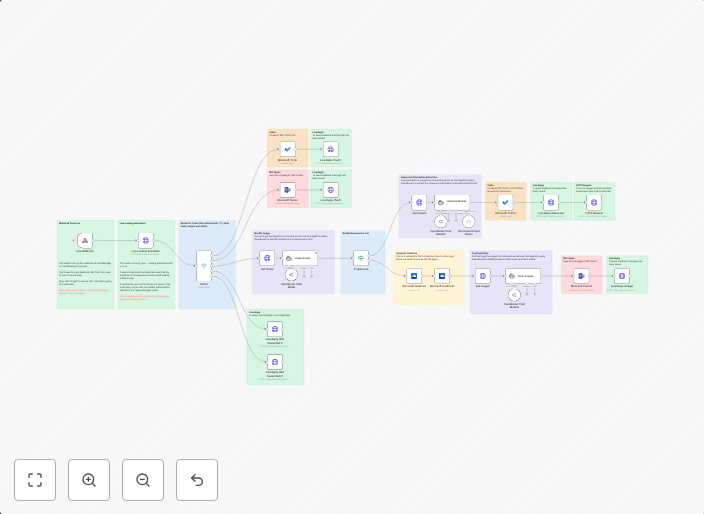
LINE messages with GPT: Save notes, namecard data and tasks
This workflow template, "Personal Assistant to Note Messages and Extract Namecard Information" is designed to streamline the processing of incoming messages...
Get This WorkflowAbout This Workflow
What This Workflow Does
This workflow template, "Personal Assistant to Note Messages and Extract Namecard Information," is designed to automate the process of processing incoming LINE messages. It saves notes, extracts namecard data, and assigns tasks, making it easier to manage personal productivity and streamline communication. By leveraging this workflow, users can save time and improve their overall organization.
Who Should Use This
This workflow is ideal for individuals who use LINE messaging and want to enhance their personal productivity, such as professionals, entrepreneurs, and students who frequently receive messages that require follow-up or organization.
Key Features
- Save Notes: Automatically save incoming messages as notes, allowing users to quickly reference and review conversations.
- Extract Namecard Information: Extract contact information from LINE namecards and store it in a centralized location, making it easy to add new contacts or update existing ones.
- Assign Tasks: Assign tasks based on incoming messages, enabling users to prioritize and manage their to-do lists more effectively.
How to Get Started
To get started with this workflow, simply import it into your n8n account and customize the settings to fit your specific needs. You can then connect your LINE account and start automating the processing of your incoming messages.
Use This Workflow in n8n →Similar Workflows




Affiliate Disclosure: We may earn a commission if you sign up for n8n through our links. This doesn't affect our recommendations.