Manage Google Calendar events with natural language using Gemini 1.5 Flash
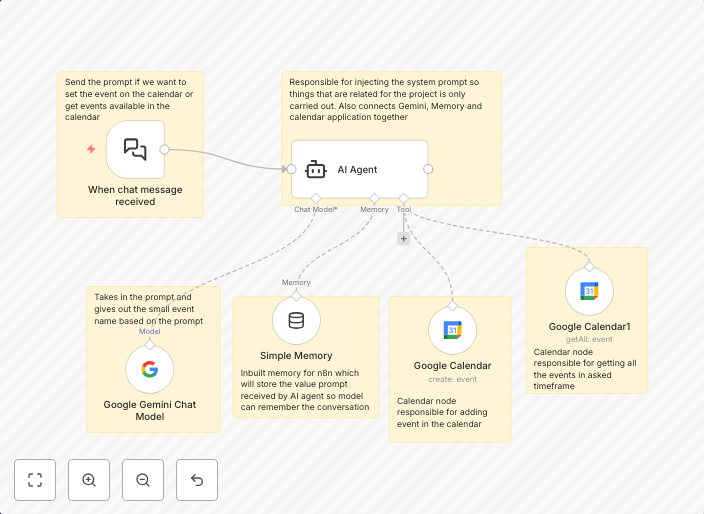
This is the AI agent which will set the event in the Google Calendar and get the events from the calendar based on the prompt provided to AI agent based on...
Get This WorkflowAbout This Workflow
What This Workflow Does
This workflow allows users to manage Google Calendar events using natural language processing with the Gemini 1.5 Flash AI agent. It can create new events in the Google Calendar and retrieve existing events based on user prompts. This automation streamlines personal productivity by automating the process of scheduling and organizing events.
Who Should Use This
This workflow is ideal for individuals and teams looking to enhance their personal productivity and streamline their event management processes. It's particularly useful for busy professionals, developers, and marketers who need to schedule and organize multiple events.
Key Features
- Creates new events in Google Calendar using natural language input from the Gemini 1.5 Flash AI agent.
- Retrieves existing events from Google Calendar based on user prompts.
- Simplifies event management by automating the process of scheduling and organization.
- Integrates with the Gemini 1.5 Flash AI agent for natural language processing capabilities.
How to Get Started
To use this workflow, simply import it into your n8n account and customize the workflow settings to connect with your Google Calendar and Gemini 1.5 Flash AI agent. From there, you can start using the workflow to create and retrieve events using natural language inputs.
Use This Workflow in n8n →Similar Workflows




Affiliate Disclosure: We may earn a commission if you sign up for n8n through our links. This doesn't affect our recommendations.