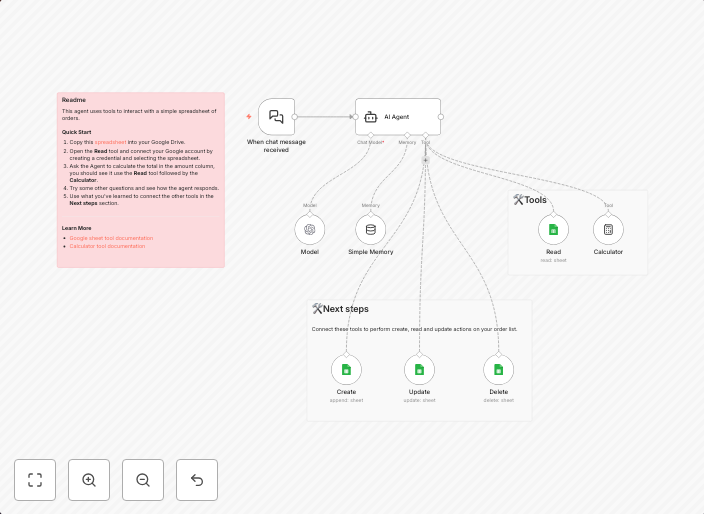
Manage Google Sheets data with GPT-4 natural language processing & calculator
Screenshot 20250826 Who’s it for This template is for users who want to combine the power of AI with Google Sheets for managing and calculating data...
Get This WorkflowAbout This Workflow
What This Workflow Does
This workflow combines the power of GPT-4 natural language processing with Google Sheets to enable automatic data management and calculation. It allows users to leverage AI capabilities to process and analyze data within their Google Sheets, making it easier to make informed decisions. The result is a streamlined and efficient workflow that saves time and reduces manual errors.
Who Should Use This
This template is designed for users who want to tap into the potential of AI and automation in their workflow, including developers, marketers, and business owners who rely on Google Sheets for data management.
Key Features
- Automated data processing: Use GPT-4 to analyze and process data within Google Sheets, saving time and effort.
- Customizable calculations: Leverage the power of GPT-4 to perform complex calculations and create custom formulas.
- Integration with Google Sheets: Seamlessly integrate with Google Sheets to manage and analyze data in one place.
- AI-powered insights: Use GPT-4 to generate insights and recommendations based on your data, helping you make informed decisions.
How to Get Started
To use this workflow, simply import it into your n8n account and customize the settings to match your specific needs. From there, you can connect your Google Sheets account and start leveraging the power of GPT-4 to manage and analyze your data.
Use This Workflow in n8n →Similar Workflows




Affiliate Disclosure: We may earn a commission if you sign up for n8n through our links. This doesn't affect our recommendations.