Manage User Authentication with Telegram, Redis Cache and Google Sheets
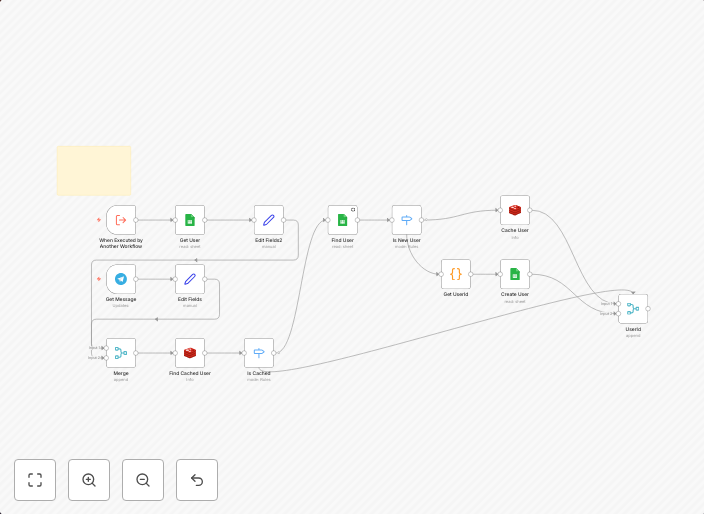
How It Works Telegram bot listens for messages and uses chat ID as the unique user identifier.Checks Google Sheets for existing users; registers new users...
Get This WorkflowAbout This Workflow
Manage User Authentication with Telegram, Redis Cache and Google Sheets
This workflow automates user authentication by integrating Telegram, Redis Cache, and Google Sheets. It listens for messages from Telegram, checks for existing users in Google Sheets, and registers new users with a unique identifier based on the chat ID. This seamless authentication process streamlines user management and registration.
This workflow is ideal for developers, business owners, and marketers who want to create a robust and efficient user authentication system for their Telegram-based applications or services.
- Telegram Bot Integration: Listens for messages and uses chat IDs as unique user identifiers.
- Redis Cache Integration: Enhances user authentication speed and efficiency by caching user data.
- Google Sheets Integration: Checks for existing users and registers new users in a Google Sheets database.
To use this workflow, import it into your n8n instance and customize the Telegram bot settings, Redis Cache credentials, and Google Sheets spreadsheet ID to match your specific requirements.
Use This Workflow in n8n →Similar Workflows




Affiliate Disclosure: We may earn a commission if you sign up for n8n through our links. This doesn't affect our recommendations.