Manage WhatsApp chats centrally on Slack
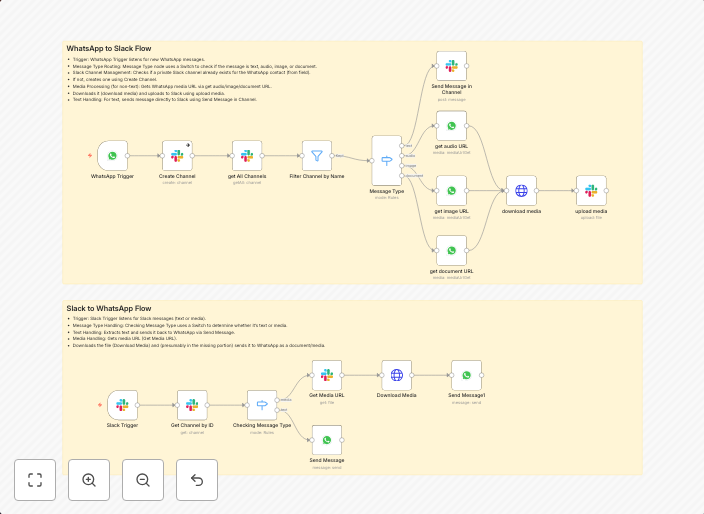
This workflow enables seamless, bidirectional communication between WhatsApp and Slack using n8n. It automates the reception, processing, and forwarding of...
Get This WorkflowAbout This Workflow
What This Workflow Does
This workflow allows you to centralize WhatsApp chats within Slack, enabling seamless communication between teams. It automates the reception, processing, and forwarding of WhatsApp messages to Slack, facilitating streamlined communication and collaboration. This bidirectional integration ensures that all team members stay informed and connected.
Who Should Use This
This workflow is ideal for businesses, teams, and organizations that rely on WhatsApp for communication and want to leverage Slack's collaborative features. It's particularly useful for support teams, customer service departments, and marketing agencies.
Key Features
- Automated WhatsApp to Slack forwarding: Receive and process WhatsApp messages directly in Slack, eliminating the need for manual forwarding.
- Bidirectional communication: Send messages from Slack to WhatsApp, enabling seamless two-way communication with customers and team members.
- Customizable workflow: Import and customize the workflow to suit your team's specific needs and integration requirements.
- Real-time updates: Ensure that all team members receive real-time updates on WhatsApp conversations, fostering timely collaboration and response.
How to Get Started
To use this workflow, import it into your n8n instance and customize the settings to fit your team's specific needs. Follow the onboarding process to connect your WhatsApp and Slack accounts, and start automating your communication workflows.
Use This Workflow in n8n →Similar Workflows



Affiliate Disclosure: We may earn a commission if you sign up for n8n through our links. This doesn't affect our recommendations.