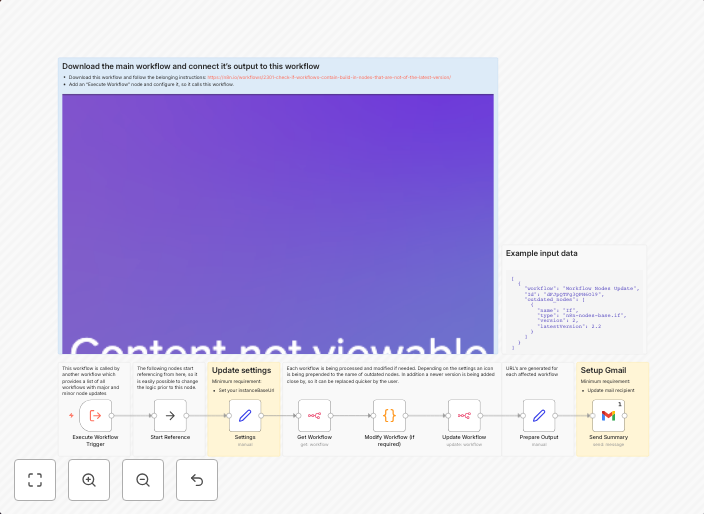
Mark outdated workflow nodes on canvas and send a summary with Gmail (add-on)
This is an add-on for the template Check if workflows contain build-in nodes that are not of the latest version Purpose This workflow highlights outdated...
Get This WorkflowAbout This Workflow
What This Workflow Does
This workflow is designed to highlight outdated workflow nodes on the n8n canvas and send a summary of the outdated nodes via Gmail. By automating this process, users can easily identify and update outdated nodes, ensuring that their workflows are up-to-date and running smoothly. The workflow utilizes the built-in "Check if workflows contain build-in nodes that are not of the latest version" template as a starting point.
Who Should Use This
This workflow is ideal for developers, DevOps teams, and IT professionals responsible for maintaining and updating workflows in n8n. They will benefit from the automation's ability to quickly identify and report outdated nodes, streamlining their workflow management process.
Key Features
- Highlights outdated workflow nodes on the n8n canvas, making it easy to identify and update them.
- Sends a summary of the outdated nodes via Gmail, providing a record of the updates needed.
- Utilizes the built-in "Check if workflows contain build-in nodes that are not of the latest version" template for accurate version checks.
- Automates the process of identifying and reporting outdated nodes, saving time and effort.
How to Get Started
To use this workflow, simply import it into your n8n instance and customize the Gmail add-on to match your email settings. From there, the workflow will automatically scan your workflows for outdated nodes and send you a summary via email.
Use This Workflow in n8n →Similar Workflows




Affiliate Disclosure: We may earn a commission if you sign up for n8n through our links. This doesn't affect our recommendations.