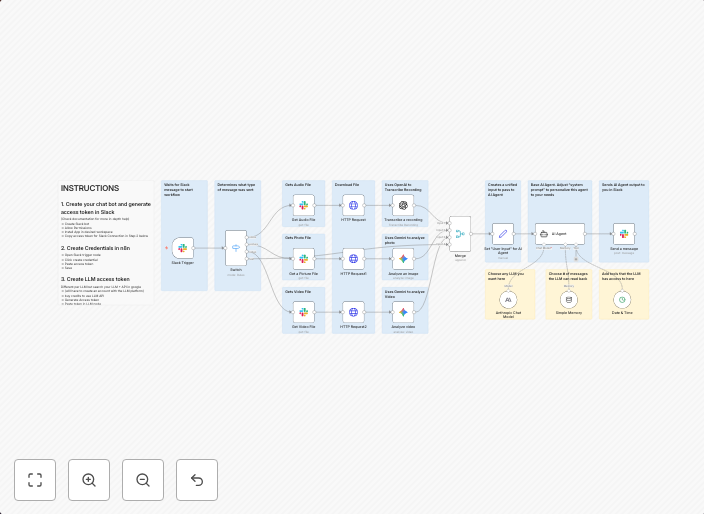
Multimodal Slack AI assistant with voice, image & video processing
What it's for:This is a base template for anyone trying to develop a Slack bot AI Agent. This base allows for multiple inputs (Voice, Picture, Video, and...
Get This WorkflowAbout This Workflow
What This Workflow Does
This multimodal Slack AI assistant workflow enables users to integrate voice, image, and video processing into a single Slack bot AI agent. It provides a base template for developers to create a more comprehensive AI chatbot. This workflow automates the processing of different input types, allowing users to interact with their AI agent in various ways.
Who Should Use This
This workflow is ideal for developers, marketers, and business owners looking to create a robust AI-powered chatbot for their Slack workspace. It's perfect for those who want to experiment with multimodal interactions and create a more engaging user experience.
Key Features
- Voice Input Processing: Integrate speech recognition to allow users to interact with their AI agent using voice commands.
- Image and Video Analysis: Use computer vision to analyze images and videos uploaded to Slack, and trigger custom responses or actions.
- Multimodal Output: Send responses back to users in various formats, including text, images, and videos.
How to Get Started
To use this workflow, simply import it into your n8n account and customize the settings to fit your specific use case. You can then add or remove nodes to suit your needs, and start building your multimodal AI chatbot for Slack.
Use This Workflow in n8n →Similar Workflows




Affiliate Disclosure: We may earn a commission if you sign up for n8n through our links. This doesn't affect our recommendations.