Qualify new leads in Google Sheets via OpenAI's GPT-4
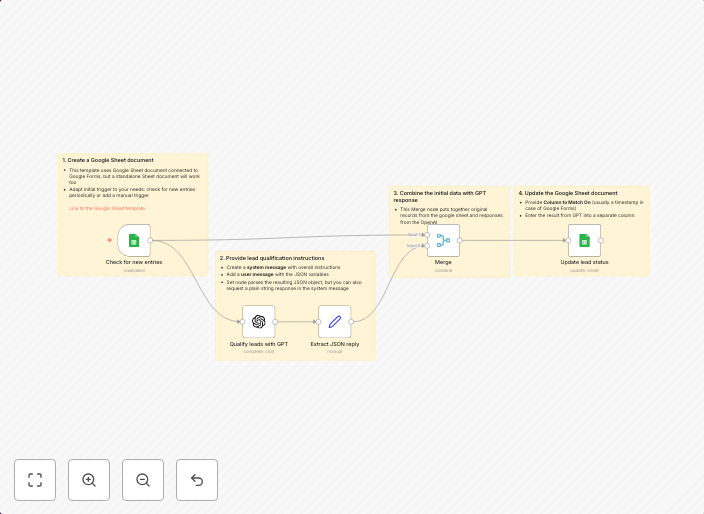
This n8n workflow was developed to evaluate and categorize incoming leads based on certain criteria. The workflow is triggered by adding a new row in a...
Get This WorkflowAbout This Workflow
What This Workflow Does
This n8n workflow is designed to automatically qualify new leads in a Google Sheets document by analyzing them using OpenAI's GPT-4, a powerful AI model. Based on pre-defined criteria, it categorizes incoming leads, saving time and effort for businesses. The workflow streamlines the lead qualification process, enabling teams to focus on high-value tasks.
Who Should Use This
This automation is ideal for marketers, sales teams, and business owners who manage lead generation and qualification processes. It's particularly useful for those with existing Google Sheets infrastructure and a need to leverage AI-powered insights.
Key Features
- Triggers on new row additions in a designated Google Sheets spreadsheet.
- Utilizes OpenAI's GPT-4 to analyze and summarize lead information.
- Evaluates leads based on predefined criteria and assigns a qualification status.
- Saves categorized leads in the Google Sheets document for easy tracking and follow-up.
How to Get Started
To use this workflow, import it into your n8n instance and configure the Google Sheets and OpenAI integrations according to your credentials. Customize the workflow settings to match your specific lead qualification criteria and Google Sheets layout.
Use This Workflow in n8n →Similar Workflows




Affiliate Disclosure: We may earn a commission if you sign up for n8n through our links. This doesn't affect our recommendations.