QuickBooks automated invoicing - sync Google Sheets with QBO
Video IntroductionVideo Walkthrough Want to automate your inbox or need a custom workflow? 📞 Book a Call | 💬 DM me on Linkedin Overview This workflow...
Get This WorkflowAbout This Workflow
What This Workflow Does
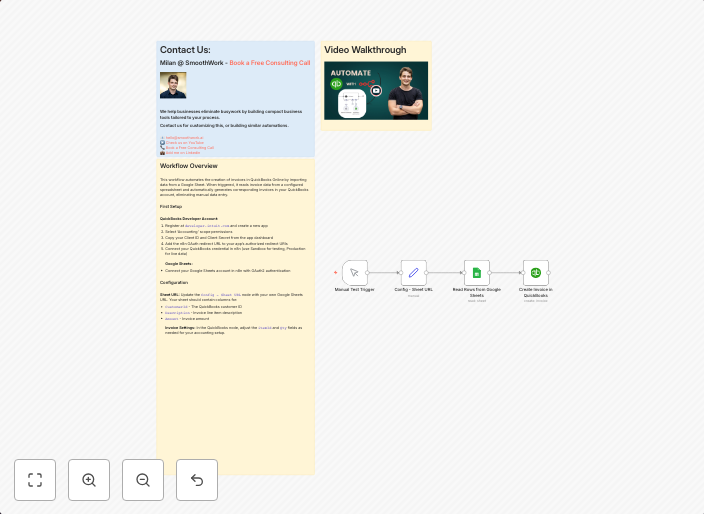
This n8n automation workflow synchronizes data between Google Sheets and QuickBooks Online (QBO), enabling automated invoicing by transferring customer and invoice information from your Google Sheets to QuickBooks. The workflow streamlines the invoicing process, saving time and reducing the risk of manual errors. It also allows for real-time updates and syncing of data between the two platforms.
Who Should Use This
This workflow is ideal for small business owners, bookkeepers, and accountants who use Google Sheets and QuickBooks Online for managing customer relationships and generating invoices. It is particularly useful for those who want to automate repetitive tasks and increase efficiency in their accounting and invoicing processes.
Key Features
- Automated Data Syncing: The workflow transfers customer and invoice data from Google Sheets to QuickBooks Online, ensuring that your accounting records are up-to-date and accurate.
- Real-time Updates: The workflow enables real-time updates and syncing of data between Google Sheets and QuickBooks Online, ensuring that any changes are reflected immediately.
- Reduced Manual Errors: By automating the invoicing process, the workflow reduces the risk of manual errors, such as incorrect customer information or duplicate invoices.
- Customizable: The workflow is fully customizable, allowing users to tailor it to their specific needs and requirements.
How to Get Started
To get started with this workflow, simply import it into your n8n account and customize the nodes to match your specific data sources and requirements. The workflow is easy to set up and can be adapted to fit your unique business needs.
Use This Workflow in n8n →Similar Workflows




Affiliate Disclosure: We may earn a commission if you sign up for n8n through our links. This doesn't affect our recommendations.