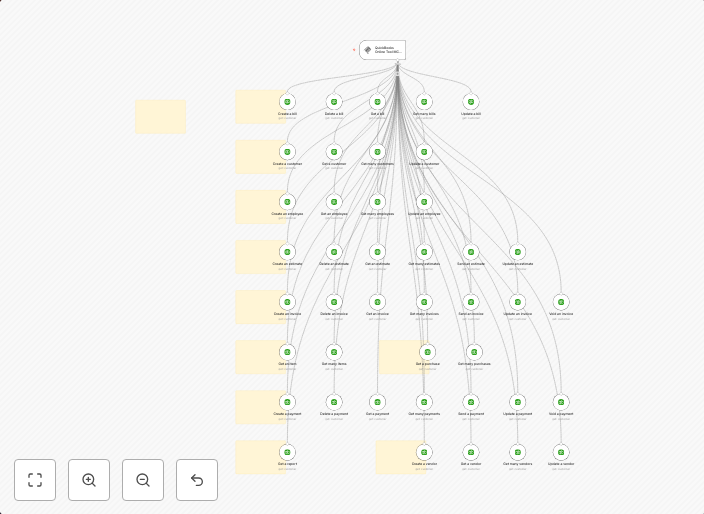
🛠️ QuickBooks Online tool MCP Server 💪 all 42 operations
Need help? Want access to this workflow + many more paid workflows + live Q&A sessions with a top verified n8n creator? Join the community Complete MCP...
Get This WorkflowAbout This Workflow
What This Workflow Does
This n8n automation workflow integrates with QuickBooks Online and MCP Server to automate all 42 operations, streamlining business processes and increasing productivity. The workflow provides a comprehensive solution for synchronizing data between the two systems. By automating these operations, users can save time and reduce the risk of manual errors.
Who Should Use This
This workflow is ideal for business owners, developers, and marketers who rely on QuickBooks Online and MCP Server for their operations, and want to maximize the efficiency of their workflows. It is particularly useful for those who need to automate complex integrations and data synchronization tasks.
Key Features
- Automates all 42 operations between QuickBooks Online and MCP Server
- Streamlines data synchronization for increased productivity and reduced manual errors
- Enhances integration between CRM and AI RAG systems
- Supports seamless data exchange between the two connected systems
How to Get Started
To start using this workflow, import it into your n8n instance and customize it to fit your specific business needs. Make sure to review and configure the workflow's settings and connections to ensure a smooth integration with your QuickBooks Online and MCP Server accounts.
Use This Workflow in n8n →Similar Workflows




Affiliate Disclosure: We may earn a commission if you sign up for n8n through our links. This doesn't affect our recommendations.