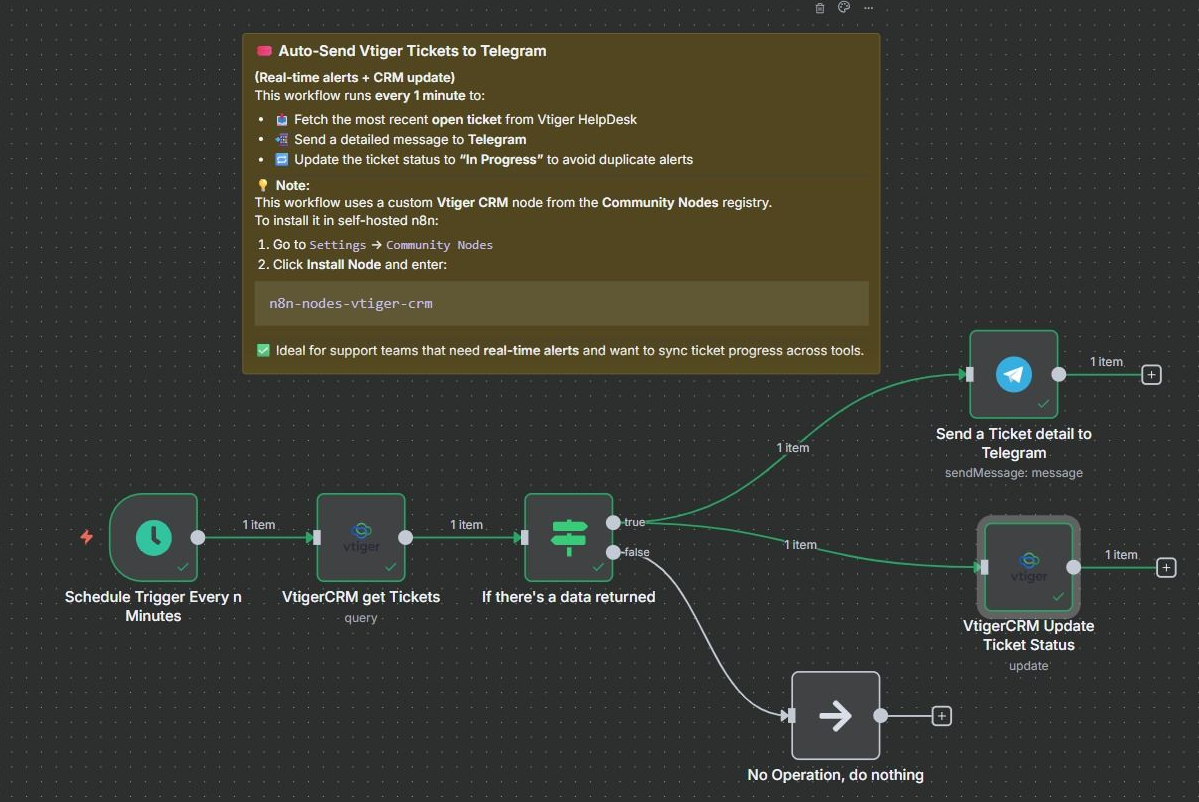
Real-time Vtiger support tickets to Telegram with auto status updates
⚠️ This Workflow Requires a Community Node and a Self-Hosted n8n Instance > This workflow uses the Vtiger CRM community node. To use it, you must be...
Get This WorkflowAbout This Workflow
What This Workflow Does
This workflow automates the process of sending real-time Vtiger support tickets to Telegram, along with automatic status updates. It integrates Vtiger CRM with Telegram, enabling seamless communication between support teams and customers. This ensures timely and efficient ticket resolution.
Who Should Use This
This workflow is ideal for business owners, support teams, and developers who use Vtiger CRM for customer support and want to integrate it with Telegram for real-time updates and communication.
Key Features
- Real-time ticket updates: Automatically sends new support tickets to Telegram.
- Automated status updates: Keeps customers informed about the status of their tickets.
- Integration with Vtiger CRM: Seamlessly connects Vtiger CRM with Telegram for efficient communication.
- Customizable workflow: Allows users to customize the workflow to suit their specific needs.
How to Get Started
To use this workflow, import it into your self-hosted n8n instance and connect your Vtiger CRM and Telegram accounts. Configure the workflow settings to fit your specific requirements and start automating your support ticket updates.
Use This Workflow in n8n →Similar Workflows




Affiliate Disclosure: We may earn a commission if you sign up for n8n through our links. This doesn't affect our recommendations.