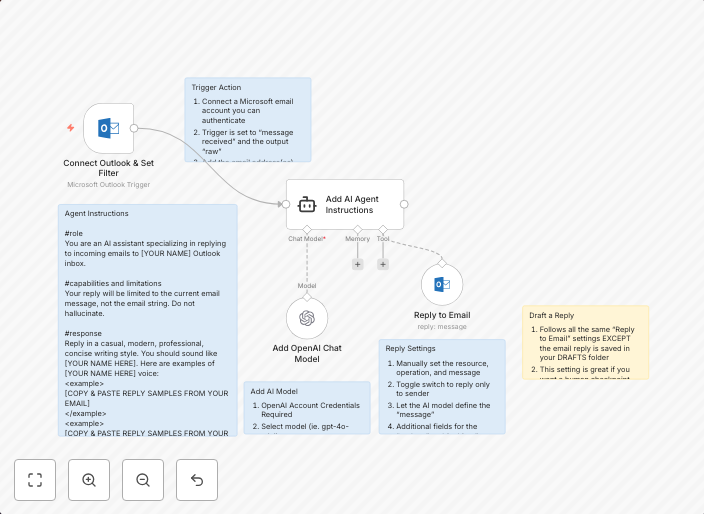
Reply to Outlook emails with OpenAI
Who is this template for?This template is for any Microsoft Outlook user who wants a trained AI agent to reason and reply on their behalf. Teach your agent...
Get This WorkflowAbout This Workflow
What This Workflow Does
This template automates the process of replying to Outlook emails using OpenAI's trained AI agent. By doing so, it enables users to have their emails replied to on their behalf, leveraging the reasoning and response capabilities of the AI agent. The workflow streamlines ticket management and email responses, saving users time and effort.
Who Should Use This
This template is ideal for Microsoft Outlook users who want to leverage AI-powered automation to manage their email responses, particularly those working in customer support, ticket management, or any field where timely and accurate email responses are crucial.
Key Features
- AI-powered email responses: Reply to Outlook emails with OpenAI-generated responses.
- Customizable AI agent: Train and fine-tune the AI agent to reason and respond according to your specific needs.
- Automated ticket management: Leverage the AI agent to manage and respond to tickets in your Outlook inbox.
- Integration with OpenAI: Seamlessly integrate with OpenAI's API to access its reasoning and response capabilities.
How to Get Started
To use this template, simply import it into your n8n workflow and customize the AI agent to fit your specific needs. You can then connect your Outlook account and start using the AI-powered automation to reply to emails and manage tickets.
Use This Workflow in n8n →Similar Workflows




Affiliate Disclosure: We may earn a commission if you sign up for n8n through our links. This doesn't affect our recommendations.