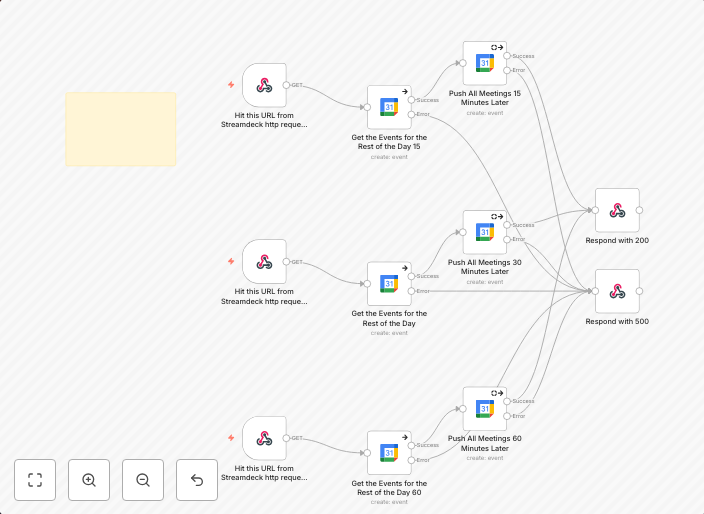
Reschedule Google Calendar appointments with Stream Deck (15/30/60 min)
Need help? Want access to this workflow + many more paid workflows + live Q&A sessions with a top verified n8n creator? Join the community ⏰ Move All...
Get This WorkflowAbout This Workflow
What This Workflow Does
This workflow automates the process of rescheduling Google Calendar appointments using a Stream Deck, offering flexible time increments (15, 30, or 60 minutes) for rescheduling. It streamlines the process of adjusting meeting times, saving users time and increasing productivity. The workflow integrates seamlessly with Google Calendar and Stream Deck to facilitate efficient time management.
Who Should Use This
This workflow is ideal for individuals who frequently use Google Calendar for scheduling appointments and meetings, such as entrepreneurs, remote workers, and teams that rely on digital calendars for organization and coordination.
Key Features
- Reschedules Google Calendar appointments using Stream Deck buttons
- Offers three time increment options (15, 30, or 60 minutes) for rescheduling
- Seamlessly integrates with Google Calendar and Stream Deck
- Automates the process of adjusting meeting times, saving time and increasing productivity
How to Get Started
To use this workflow, import it into your n8n instance and customize the Stream Deck integration settings to match your specific requirements. You can then use the Stream Deck buttons to easily reschedule appointments in Google Calendar, taking advantage of the flexible time increments and streamlined process.
Use This Workflow in n8n →Similar Workflows




Affiliate Disclosure: We may earn a commission if you sign up for n8n through our links. This doesn't affect our recommendations.