Schedule appointments via Telegram with GPT-4o & Google Calendar
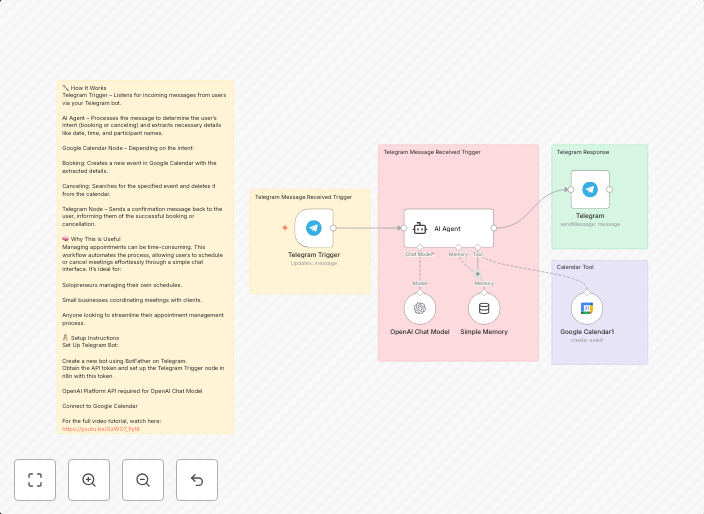
🔧 How It WorksTelegram Trigger – Listens for incoming messages from users via your Telegram bot. Watch Full Step-by-step Guide Video...
Get This WorkflowAbout This Workflow
What This Workflow Does
This workflow automates the process of scheduling appointments via Telegram using the power of GPT-4o (a conversational AI) and Google Calendar. When a user sends a message to the Telegram bot, the workflow uses GPT-4o to understand the user's request and generate a suitable response. The response includes a Google Calendar appointment link, making it easy for users to book an appointment.
Who Should Use This
This workflow is ideal for developers, marketers, and business owners who want to create a seamless support chatbot experience for their users. By integrating a conversational AI and a calendar system, they can provide a convenient and efficient way for users to schedule appointments.
Key Features
- Telegram Trigger: Listens for incoming messages from users via your Telegram bot, enabling a seamless user experience.
- GPT-4o Integration: Uses the conversational AI to understand user requests and generate suitable responses, including calendar appointment links.
- Google Calendar Integration: Automatically generates calendar appointment links, making it easy for users to book appointments.
- Automated Response Generation: Saves time by automatically generating responses to user requests, reducing the load on support teams.
How to Get Started
To use this workflow, simply import it into your n8n instance and customize it to fit your specific Telegram bot and Google Calendar settings. You can then test the workflow to ensure it's working as expected and make any necessary adjustments.
Use This Workflow in n8n →Similar Workflows




Affiliate Disclosure: We may earn a commission if you sign up for n8n through our links. This doesn't affect our recommendations.