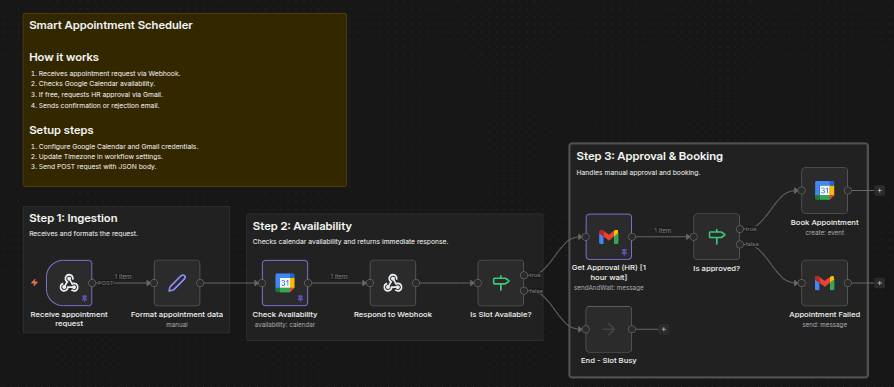
Schedule appointments with manual approval using Google Calendar and Gmail
Tired of automated booking tools cluttering your calendar with spam or overlapping meetings? SyncPoint is a “Smart Gatekeeper” that checks your availability...
Get This WorkflowAbout This Workflow
What This Workflow Does
This n8n automation workflow, titled "Schedule appointments with manual approval using Google Calendar and Gmail," acts as a "Smart Gatekeeper" by checking the user's availability in Google Calendar before scheduling appointments. It integrates with Gmail to manage incoming booking requests and ensures that only approved meetings are added to the calendar. This workflow aims to prevent automated booking tools from cluttering the calendar with spam or overlapping meetings.
Who Should Use This
This workflow is ideal for business owners, managers, or customer support teams who rely on Google Calendar and Gmail for scheduling appointments and managing bookings. It's perfect for those who want to maintain control over their calendar and ensure that only legitimate meetings are scheduled.
Key Features
- Manual approval for incoming booking requests: Users receive notifications via Gmail, allowing them to review and approve or decline booking requests before they're added to the calendar.
- Availability checks in Google Calendar: The workflow checks the user's availability in Google Calendar before scheduling new meetings, preventing overlapping appointments and ensuring that the calendar remains accurate.
- Integration with Gmail: The workflow seamlessly integrates with Gmail, enabling users to manage booking requests and approve or decline them directly from their email inbox.
- Customizable approval process: Users can set up a customizable approval process, allowing them to specify the conditions under which booking requests are approved or declined.
How to Get Started
To get started with this workflow, simply import it into your n8n account and customize it to fit your specific needs. You can adjust the workflow settings to match your Google Calendar and Gmail integration, ensuring that it works seamlessly with your existing systems.
Use This Workflow in n8n →Similar Workflows




Affiliate Disclosure: We may earn a commission if you sign up for n8n through our links. This doesn't affect our recommendations.