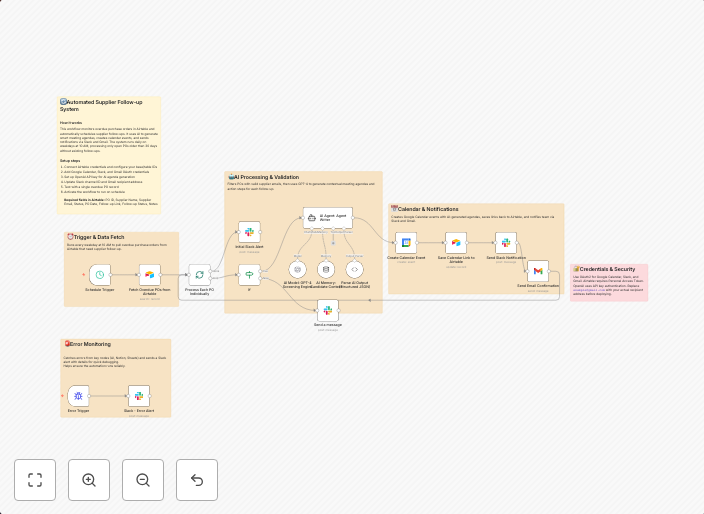
Schedule supplier follow-ups from Airtable POs to Google Calendar with AI, Slack & Gmail
📊 DescriptionEnsure suppliers never miss a follow-up by automating overdue purchase order tracking and scheduling. 📦⏰ This workflow checks Airtable every...
Get This WorkflowAbout This Workflow
What This Workflow Does
This workflow automates the process of tracking overdue purchase orders in Airtable and scheduling follow-ups with suppliers in Google Calendar. It utilizes AI to summarize important information and sends reminders through Slack. The workflow also integrates with Gmail for sending notifications.
Who Should Use This
This workflow is suitable for business owners, project managers, and procurement teams who want to streamline their supplier follow-up process and ensure timely communication with their suppliers.
Key Features
- Tracks overdue purchase orders in Airtable and identifies suppliers who need a follow-up
- Uses AI to summarize key information from Airtable purchase orders for easy reference
- Automatically schedules follow-ups with suppliers in Google Calendar
- Sends reminders and notifications through Slack and Gmail
How to Get Started
To use this workflow, import it into your n8n account and customize it to fit your specific Airtable and Google Calendar setup. Adjust the workflow's settings as needed to ensure seamless integration with your existing tools and workflows.
Use This Workflow in n8n →Similar Workflows




Affiliate Disclosure: We may earn a commission if you sign up for n8n through our links. This doesn't affect our recommendations.